How Much Hardware Does a Private ChatGPT Actually Need?
Size CPU, RAM, VRAM and storage for Open WebUI, Ollama, local RAG and multiple users without buying an oversized AI server.
Size CPU, RAM, VRAM and storage for Open WebUI, Ollama, local RAG and multiple users without buying an oversized AI server.
Open WebUI can run on a small mini PC. A useful local language model might not. Mixing those two requirements is how people end up spending $2,000 on a personal chatbot or loading a 12-billion-parameter model into 8 GB of RAM and waiting long enough to forget the question.
The interface is the light part. Model weights, context length, concurrent requests, and loaded services determine the machine.
This guide sizes a private ChatGPT-style stack built from Open WebUI and Ollama. The profiles are planning ranges based on model memory and service behavior, not benchmark guarantees. Tokens per second vary with the exact CPU, GPU, quantization, context, prompt processing, cooling, drivers, and runtime release.
Start With the Workload
Answer five questions before shopping:
- How many people will use it at the same time?
- Is the job short chat, coding, long documents, or vision?
- What model size and quantization have you tested?
- How much context does the real workload require?
- Must the server remain on all day?
“I want a private ChatGPT” does not answer any of them.
Open WebUI handles accounts, chats, files, and routing. Ollama holds model weights and the key-value cache used for context. RAG adds extraction, an embedding model, vectors, and retrieved text. Multiple users can multiply context memory even when they share one model.
The Four Resources That Matter
VRAM decides how comfortably GPU inference fits
If the model, runtime overhead, and context fit in VRAM, generation is usually much faster than CPU-only inference. If part of the model spills to system RAM, it can still work, but PCIe transfers and CPU participation reduce performance.
Model file size is only the starting point. Context consumes additional memory. Ollama’s context length documentation explicitly warns that larger context requires more memory and recommends checking placement with:
ollama psLook at the PROCESSOR column. A model reported as fully on GPU is a different workload from one split between CPU and GPU.
System RAM is the fallback and the service pool
RAM holds the operating system, Docker Desktop, Open WebUI, databases, extraction processes, CPU-loaded models, and anything offloaded from the GPU. Windows plus Docker Desktop makes an 8 GB machine a poor permanent host even before a model loads.
For a fresh build, I consider 16 GB the practical floor for small personal models and 32 GB the comfortable starting point for RAG or GPU offload. Larger CPU-only models and several loaded services can justify 64 GB.
CPU controls the experience when the GPU cannot
CPU inference favors modern cores, memory bandwidth, and supported instruction sets. More cores help prompt processing and concurrent services, but memory bandwidth often becomes the wall for quantized LLM generation.
An Intel N100 mini PC can host Open WebUI, embeddings, and a small model for patient personal use. It is not a tiny substitute for a 12 GB GPU. Expectations are part of the specification.
Storage is capacity, latency, and recovery
Use an SSD for the operating system, Open WebUI data, model files, and vector indexes. A 1 TB NVMe drive is a sensible starting point when you expect several models and document collections. Ollama notes that model storage can reach tens or hundreds of gigabytes and documents OLLAMA_MODELS for moving the library.
Keep backups on another device or drive. RAID and a second partition are not independent backups.
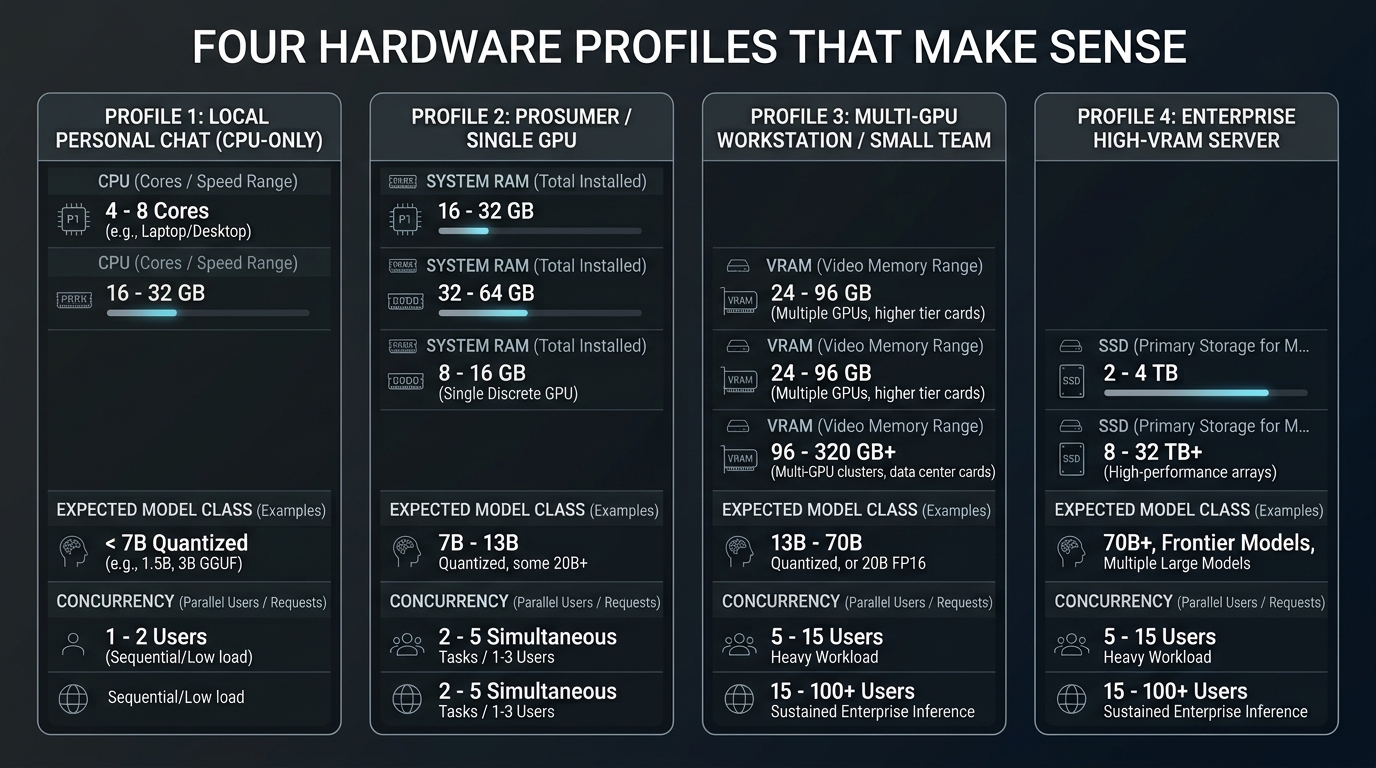
Four Hardware Profiles That Make Sense
Profile 1: CPU-only personal chat
Target: one user, short prompts, small quantized model, light embeddings.
CPU: modern 4 to 8 cores
RAM: 16 GB minimum, 32 GB preferred
GPU: integrated or none
Storage: 500 GB to 1 TB SSD
This is the reuse profile for an existing desktop or business mini PC. Start with a 2B to 4B quantized model. A 7B or 8B model may run with enough RAM, but “loads successfully” and “pleasant interactive latency” are not synonyms.
It works well for occasional summarization, simple drafting, and testing RAG. It is weak for long coding sessions, large contexts, vision models, and several users.
If you already have an unused machine, test it before buying anything. What to Do With an Old PC covers the less glamorous but useful checks: storage health, idle power, cooling, and recovery.
Profile 2: entry GPU workstation
Target: one active user, 4B to 8B quantized models, local RAG, responsive chat.
CPU: modern 6 cores or better
RAM: 32 GB
GPU: 8 GB VRAM
Storage: 1 TB NVMe SSD
Power: measured at idle and load
Eight gigabytes of VRAM is useful, but it demands discipline. Model weights, context, and runtime overhead must share the same space. A smaller Q4 model with a realistic context often feels better than a larger model repeatedly offloading to RAM.
This tier suits an RTX 3050 8 GB or RTX 4060 8 GB class card that you already own. It also supports fast embeddings and speech workloads. For exact low-memory tactics, see How to Run a Local Coding LLM With 4GB or 8GB of VRAM.
Profile 3: comfortable single-user or light household server
Target: 8B to 14B quantized models, longer sessions, RAG, one or two light users.
CPU: modern 8 cores
RAM: 32 GB to 64 GB
GPU: 12 GB to 16 GB VRAM
Storage: 1 TB to 2 TB NVMe SSD
Network: wired gigabit Ethernet
This is the practical sweet spot for many local AI builds. Twelve gigabytes gives the model and context more room, while 64 GB of RAM provides a safer landing zone for extraction, databases, and occasional CPU offload.
An RTX 3060 12 GB can be compelling on the used market. A newer 12 GB card may be faster or more efficient, but compare idle power, case fit, power supply, and price instead of buying from one tokens-per-second chart.
Google’s published Gemma 4 memory estimates show why quantization matters: its Q4_0 estimates range from about 2.9 GB for E2B to 6.7 GB for 12B and 14.4 GB for 26B A4B, before context and runtime overhead. Family names are not capacity plans.
Profile 4: high-VRAM multi-user server
Target: larger models, multiple active users, long contexts, or multimodal services.
CPU: 12 to 16 modern cores
RAM: 64 GB to 128 GB
GPU: 24 GB VRAM or more
Storage: 2 TB NVMe plus separate backup
Network: wired gigabit or faster where justified
This tier is expensive because concurrency is expensive. It makes sense for a household or small team that has measured simultaneous use, or for a workstation already doing development, media, or model experimentation.
For one person asking ten questions per day, this tier is hard to justify. The GPU will spend most of its life converting money into idle heat with excellent benchmark potential.
Context Length Is a Hardware Setting
Long context is marketed like a feature checkbox. Locally, it is a memory allocation.
Ollama currently selects default context lengths based on available VRAM and allows explicit configuration. Larger context increases memory use even if the user sends a short prompt later. Coding tools, long documents, and agent workflows can need more context, but personal chat often does not.
Set the smallest context that handles the real job, then verify:
ollama psRun a prompt near the intended length and watch RAM, VRAM, and response latency. A model that fits at 4K context may offload or fail at a much larger allocation.
For RAG, better retrieval can reduce the need to inject entire documents. The companion Local RAG With Open WebUI shows how to test chunks and evidence instead of solving every retrieval problem with a larger context window.
Multiple Users Change the Math
Ollama supports parallel requests when memory permits. Its FAQ explains that parallel processing multiplies the effective context allocation: four parallel requests at a 2K context require the equivalent of an 8K context allocation. Multiple models also need to fit concurrently or requests will queue while models unload and reload.
For a shared server:
- start with one loaded model;
- set conservative parallelism;
- cap queue length;
- measure two realistic simultaneous prompts;
- add users only after latency remains acceptable.
Queues are not automatically a failure. For a household, waiting a few seconds may be cheaper and quieter than sizing for a peak that happens twice a month. For an interactive team tool, the same queue may be unacceptable.
Open WebUI accounts also do not provide hard resource isolation by themselves. One user uploading a large scanned PDF can compete with another user’s chat for CPU, RAM, storage I/O, and the embedding service.
RAG and Multimodal Overhead
Local RAG adds:
- extraction CPU and temporary storage;
- embedding model memory;
- vector database storage and I/O;
- retrieved tokens in the model context;
- reindexing time after embedding changes.
For one user and a modest document library, 32 GB RAM and an SSD are usually more valuable than chasing a slightly faster GPU. For scanned archives, OCR can become a CPU workload. For several users ingesting documents, separate ingestion from interactive inference or schedule bulk indexing outside busy hours.
Vision and audio models add their own weights and input processing. Running Whisper, a vision model, and an LLM concurrently is not the same as running each one in a clean benchmark. Best GPU for Home Assistant AI in 2026 compares the VRAM and power tradeoffs for those mixed local workloads.
Measure Before You Upgrade
Build the smallest working version and record:
model and quantization
context allocation
prompt processing speed
generation speed
VRAM used
system RAM used
wall power at idle
wall power during a real request
latency with two simultaneous users
Then change one constraint. Reduce context, choose a smaller quantization, stop an unused model, or move embeddings to CPU. Buy hardware only when the measurement identifies the limit.
My default recommendations are deliberately plain:
- reuse a 16 GB or 32 GB machine for the first CPU-only test;
- choose 8 GB VRAM only for known small models;
- prefer 12 GB to 16 GB VRAM for a comfortable personal RAG server;
- buy 24 GB or more only for measured larger-model or concurrency needs;
- keep Home Assistant and critical automations independent from the experimental AI host.
The separation from Home Assistant matters more than the final benchmark. A private chatbot can be unavailable for an update; lights, locks, alarms, and basic routines should not join it for the maintenance window.
Keep reading
Related guides
Local RAG With Open WebUI: Chat With Documents Without the Cloud
Build an offline Open WebUI RAG workflow for PDFs with local embeddings, practical chunking, evidence checks and private storage.
Open WebUI on Windows: Build a Private ChatGPT With Ollama
Run Open WebUI and Ollama on Windows with persistent storage, LAN access controls, backups and no accidental internet exposure.
Gemma 4 Audio Local Inference: What Works Offline and What Does Not
Test Gemma 4 audio locally for transcription and translation, with realistic runtime, format, memory and latency limits.