Gemma 4 Audio Local Inference: What Works Offline and What Does Not
Test Gemma 4 audio locally for transcription and translation, with realistic runtime, format, memory and latency limits.
Test Gemma 4 audio locally for transcription and translation, with realistic runtime, format, memory and latency limits.
“Gemma 4 supports audio” is accurate, but it skips the part that usually breaks. The right model can transcribe and translate speech locally; the runner, media decoder, processor, and API still have to agree on how the audio reaches it.
Model capability and runtime capability are different things. This article separates them, then builds a small test plan that does not depend on a demo clip behaving nicely.
Which Gemma 4 Models Accept Audio?
Google documents audio input for Gemma 4 E2B, E4B, and 12B Unified. The larger 31B model is text and image capable but does not accept audio. Gemma 4 produces text output; it does not synthesize speech.
The supported tasks include:
- automatic speech recognition in several languages;
- speech translation from a source language to a target language;
- general understanding of a short spoken clip;
- combined prompts that ask the model to extract or classify information from speech.
Google’s official audio understanding guide is the reference implementation. At the time of writing, its Python path uses PyTorch, Accelerate, and transformers>=5.10.1. That version requirement matters. An older Transformers install may load text support and fail on the multimodal processor, which is a particularly efficient way to misdiagnose the GPU.
The Audio Path Is More Than the Model
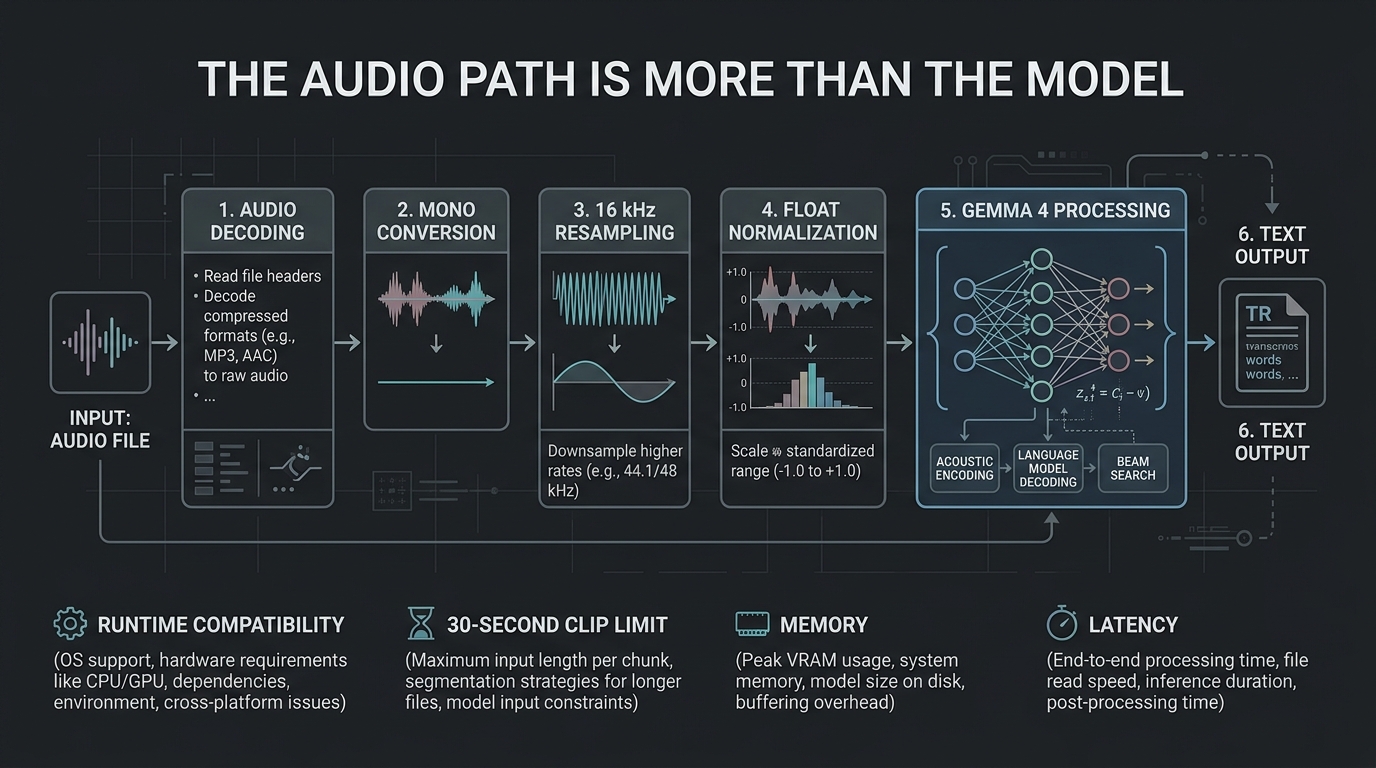
The working path looks like this:
MP3, WAV, FLAC or captured audio
  -> framework decoder
  -> mono conversion
  -> 16 kHz resampling
  -> normalized 32-bit float samples
  -> Gemma 4 processor
  -> model inference
  -> text transcription, translation or analysis
Google specifies a 16 kHz, mono, normalized 32-bit floating-point input representation and a maximum audio length of 30 seconds. It also states that Gemma 4 uses 25 tokens for each second of audio.
MP3 and WAV are not direct promises from the model. The formats you can open depend on the framework and its audio libraries. A Python environment with librosa and the required codecs may accept a file that another runner rejects.
Normalize inputs before comparing models:
ffmpeg -i input.mp3 \
  -ac 1 \
  -ar 16000 \
  -c:a pcm_f32le \
  normalized.wav
This command creates mono 16 kHz floating-point audio. It does not repair clipping, bad microphone placement, or a television playing behind the speaker. Resampling is engineering, not exorcism.
The Most Reliable Local Runtime Path
For a reproducible first test, use the runtime Google documents:
python -m venv .venvActivate the environment, then install the required packages:
pip install torch accelerate librosa
pip install "transformers>=5.10.1"
Use the instruction-tuned checkpoint that fits your hardware and follow the processor example in the official model card. Access to Gemma weights may require accepting the model license and authenticating with Hugging Face.
The important point is not the exact notebook code. It is proving these steps separately:
- the checkpoint loads;
- the processor decodes a known audio file;
- the output contains only the requested transcription;
- a second language translates correctly;
- the process still works with networking disabled.
Begin with a known local file, not microphone streaming. That removes capture, VAD, device permissions, and network services from the failure surface.
Ollama and llama.cpp Need Version-Level Verification
The Ollama registry lists Gemma 4 models with audio capability. That is useful, but the model listing alone does not prove that the exact Ollama release, client library, and request format you installed will route audio through the intended processor.
llama.cpp support has moved quickly as well. Its multimodal code, GGUF metadata, projection files, CLI support, and server API have not always landed in the same release. An older build may run Gemma 4 text perfectly and reject audio. A newer CLI may accept an audio file while a generic chat endpoint expects a different content type.
Before choosing either runtime for an application:
- record the exact build or release;
- use its official Gemma 4 audio example;
- confirm whether a separate multimodal projection file is required;
- test the CLI and the server endpoint you will actually deploy;
- repeat the test after every runtime update.
Avoid copying a command from a three-month-old issue and treating it as current documentation. Runtime support is moving faster than many tutorials can age gracefully.
For a one-off evaluation, Transformers is the conservative reference. For an always-on service, use whichever runtime passes your own API, memory, restart, and audio tests.
Memory Is Not Just the Effective Parameter Count
Gemma 4 E2B and E4B names describe effective parameters, not the complete memory footprint. Per-layer embeddings and multimodal components still need to be loaded.
Google’s Gemma 4 model overview publishes approximate inference memory requirements with overhead:
| Model | BF16 | SFP8 | Q4_0 |
|---|---|---|---|
| E2B | 11.4 GB | 5.7 GB | 2.9 GB |
| E4B | 17.9 GB | 8.9 GB | 4.5 GB |
| 12B | 26.7 GB | 13.4 GB | 6.7 GB |
These are loading estimates, not complete system requirements. Audio tokens, text context, runtime buffers, the operating system, and other services need room too. A 6.7 GB Q4 estimate on an 8 GB GPU is possible on paper and cramped in practice.
Start with E2B or E4B for functional testing. Move to 12B only after measuring accuracy against the clips that matter to you. The hardware discussion in How Much Hardware Does a Private ChatGPT Actually Need? explains why context and concurrency can change an otherwise comfortable fit.
What Works Well Offline
Short, clean transcription
Gemma 4 can transcribe a short voice note without sending the recording to a cloud API. Use a prompt that asks for transcription only. Otherwise the model may helpfully add commentary, because apparently even transcripts need a consultant.
Speech translation
The model can transcribe the source language and produce a target-language translation in one response. This is useful for private recordings, local note capture, and household voice interfaces.
Keep the transcript and translation separate in the output format. That gives you something concrete to verify when a proper noun or number is wrong.
Semantic extraction
An audio-capable model can do more than ASR:
Transcribe this maintenance note.
Then return the device name, reported fault, room and urgency as JSON.
Do not invent fields that were not spoken.
That can remove a second text-model call. Validate the JSON and retain the transcript for audit.
What Does Not Magically Work
Unlimited recordings
The documented maximum clip is 30 seconds. Longer recordings need segmentation, overlap, timestamps, and transcript assembly. Segmenting at silence boundaries is better than slicing every 30 seconds through the middle of a sentence.
Real-time wake word detection
Gemma 4 audio understanding is not a low-power wake word engine. Continuously running a multimodal LLM against room audio wastes compute and makes privacy harder to reason about. Use a dedicated local wake word detector and invoke the model only after activation.
Guaranteed diarization
Transcribing speech is not the same as reliably identifying several speakers. If speaker attribution matters, test a diarization pipeline designed for it and treat names as untrusted metadata.
Text-to-speech
The model returns text. A voice assistant still needs a local TTS engine such as Piper to speak the response.
Safe device control
Understanding “turn off everything downstairs” does not authorize direct access to every Home Assistant service. Convert the result into a validated intent or allowlisted script. The assistant architecture in Offline Voice Control for Home Assistant With Gemma 4 covers that boundary.
Build a Useful Evaluation Set
Use 20 to 50 clips from the real environment:
- quiet speech near the microphone;
- speech from across the room;
- television or fan noise;
- device names and room names;
- numbers, dates and decimal values;
- two languages you intend to support;
- silence and non-speech audio;
- a clip longer than the supported limit.
For each clip, record:
runtime and version
model and precision
audio duration and format
peak VRAM and system RAM
time to first output
total processing time
reference transcript
word or field errors
Test offline by blocking outbound traffic after the model and dependencies are cached. Watch for license checks, missing codecs, remote audio URLs, or telemetry that quietly became a requirement.
A useful result is specific: this checkpoint, runtime, input pipeline, and hardware meet this latency and accuracy target. “Gemma 4 Audio works” is easier to publish, but the narrower statement is the one you can deploy.
Keep reading
Related guides
AI Energy Management With Home Assistant and EMHASS
Use EMHASS with solar forecasts, dynamic tariffs, EV charging constraints and deterministic Home Assistant fallbacks.
Build an Offline Multimodal Voice Assistant for Home Assistant
Build a local Home Assistant voice pipeline with wake word, speech, Gemma 4 context, allowlisted actions and spoken responses.
How Much Hardware Does a Private ChatGPT Actually Need?
Size CPU, RAM, VRAM and storage for Open WebUI, Ollama, local RAG and multiple users without buying an oversized AI server.