AI Energy Management With Home Assistant and EMHASS
Use EMHASS with solar forecasts, dynamic tariffs, EV charging constraints and deterministic Home Assistant fallbacks.
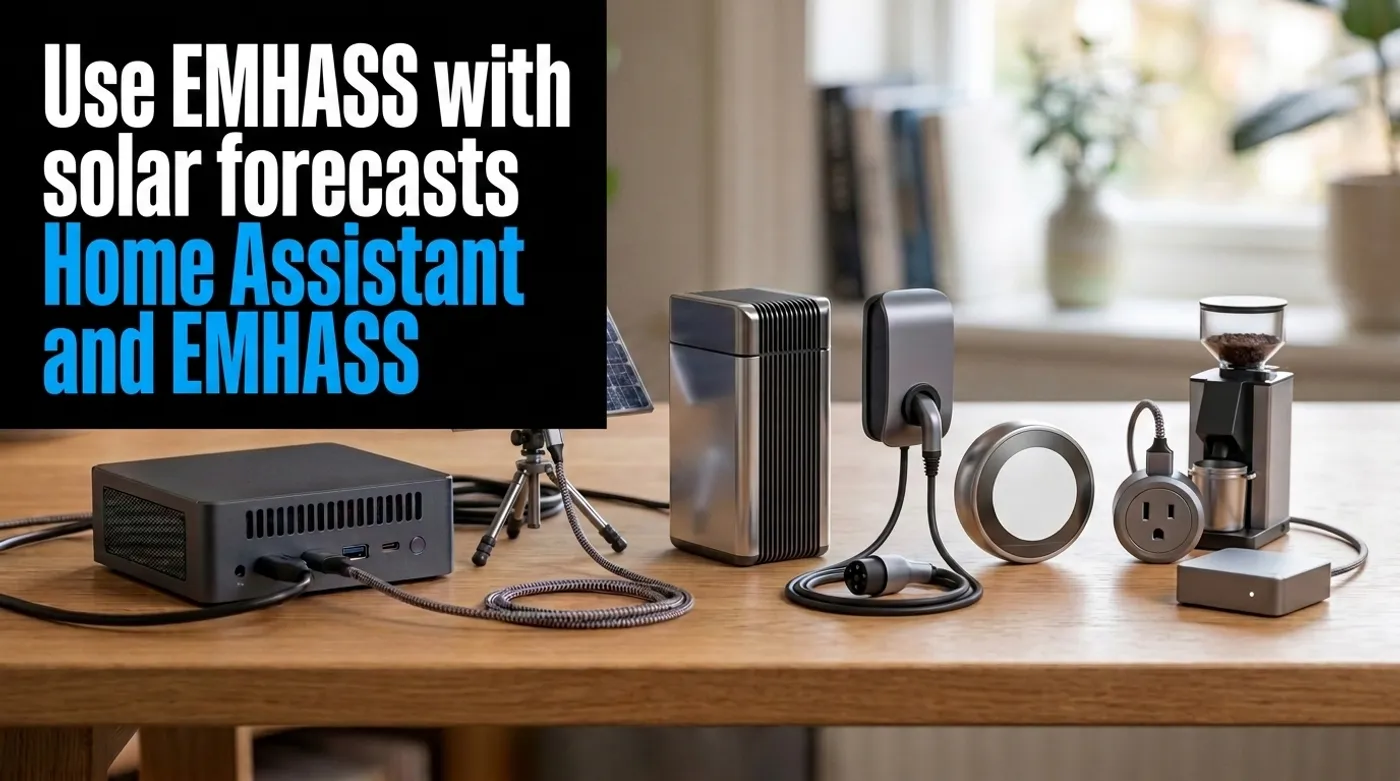
Use EMHASS with solar forecasts, dynamic tariffs, EV charging constraints and deterministic Home Assistant fallbacks.
Calling every optimizer “AI” is generous. EMHASS is useful precisely because its core is less mysterious: forecasts and mathematical optimization produce a household energy schedule that you can inspect. Hard safety rules stay outside that optimizer, where they belong.
That makes it a better fit for Home Assistant than handing an LLM control of an EV charger and asking it to save money. Creative writing is charming. Creative amperage is not.
This guide assumes reliable local power and energy sensors already exist. If not, start with Build a Local-First Whole-Home Energy Monitoring System. Optimization built on stale or incorrectly signed telemetry produces a very precise bad plan.
What EMHASS Adds
Home Assistant tells you what the house is doing now. EMHASS combines present state with future estimates:
- household load forecast;
- solar production forecast;
- import tariff by time interval;
- export compensation;
- battery state and limits;
- controllable or deferrable loads;
- optimization objective.
The result is a schedule: when to run a water heater, pool pump, battery, or EV charger to reduce cost or increase solar self-consumption.
EMHASS’s official core concepts describe cost functions, optimization timing, batteries, PV and deferrable loads. Its implementation uses linear programming. Machine-learning forecasts can improve selected inputs, but the action plan still needs explicit constraints.
Optimization Suggests; Deterministic Automation Enforces
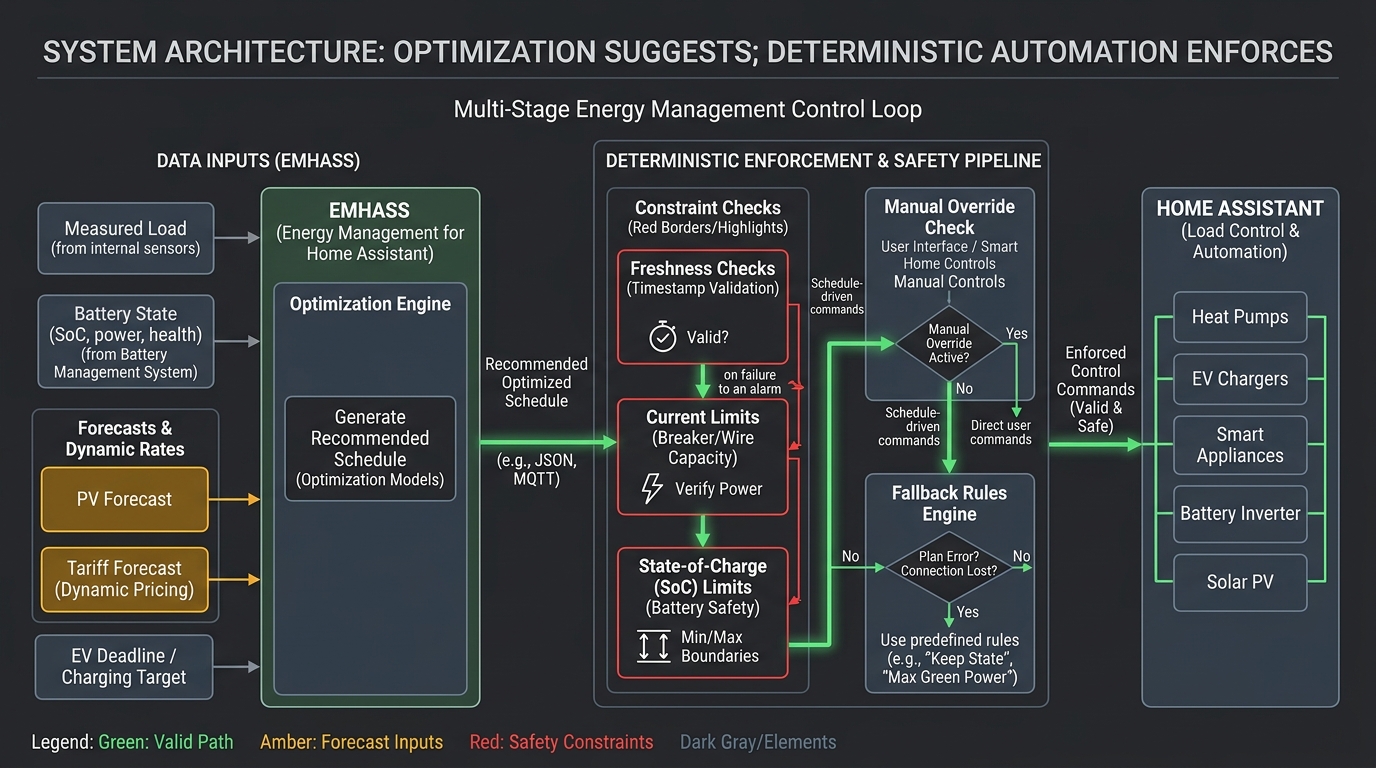
Use this control boundary:
meters and forecasts
  -> EMHASS optimization
  -> proposed schedule
  -> Home Assistant validation
  -> device-specific command
Home Assistant remains responsible for:
- maximum current and panel constraints;
- minimum battery state of charge;
- EV departure deadline;
- device availability;
- manual override;
- stale-data rejection;
- default schedule when optimization fails.
EMHASS should never be the only thing preventing an overloaded circuit or an empty car at 07:00.
Prepare Trustworthy Sensors
The minimum useful inputs are:
household consumption excluding optimized loads, W
solar production, W
grid import and export, W or kWh as appropriate
current tariff, currency/kWh
device availability
last successful sensor update
EMHASS names the main Home Assistant inputs sensor_power_load_no_var_loads and sensor_power_photovoltaics. The load sensor must exclude the deferrable loads that EMHASS is scheduling. Otherwise the optimizer can count the same EV or water-heater consumption as both base load and controlled load.
Units matter. Feed watts where the configuration expects watts and tariff values in a consistent currency per kWh. Confirm import and export signs with a known load and a sunny export period.
Add freshness sensors or template checks:
template:
  - binary_sensor:
      - name: "Energy Inputs Fresh"
        state: >
          {% set load = states.sensor.house_load_without_ev %}
          {% set solar = states.sensor.solar_power %}
          {{ load is not none
             and solar is not none
             and load.state not in ['unknown', 'unavailable']
             and solar.state not in ['unknown', 'unavailable']
             and (now() - load.last_updated).total_seconds() < 120
             and (now() - solar.last_updated).total_seconds() < 120 }}
Adjust the timeout to the meter update interval. A two-minute threshold is inappropriate for a sensor that reports every fifteen minutes.
Install and Prove the Default Model
EMHASS is available as a Home Assistant add-on and as a standalone Python service. Follow the current quick-start documentation for the installation method that matches your environment.
Connecting real loads is not the first test. Begin in observation mode:
- configure Home Assistant access;
- provide measured load history;
- run the default optimization manually;
- inspect logs and published sensors;
- compare scheduled power with the configured load limits.
The day-ahead endpoint is:
curl -i \
  -H "Content-Type: application/json" \
  -X POST \
  -d '{}' \
  http://localhost:5000/action/dayahead-optim
Run it from the Home Assistant host or trusted server network. Do not expose port 5000 to the internet.
EMHASS’s default configuration is a learning starting point, not your house model. Replace example powers, durations, tariff assumptions, and devices before publishing commands.
Add Solar Forecasting
For a solar installation, EMHASS needs:
- measured PV production;
- installed peak capacity;
- panel orientation and location as required by the forecast method;
- a weather or PV production forecast;
- import and export prices.
The official forecast module supports several approaches, including external PV forecast providers and locally adjusted forecasts based on measured history.
Forecast error is normal. Clouds arrive early, panels shade unevenly, and the inverter may clip. Re-run model predictive control during the day rather than trusting one dawn forecast until midnight.
Track forecast error:
PV forecast for interval
actual PV energy
absolute error
bias over 7 and 30 days
A forecast that consistently overestimates afternoon production will delay loads into energy that never appears. Correct the input before adding cleverer optimization.
Dynamic Tariffs Need a Complete Horizon
For time-varying electricity prices, provide one tariff value per optimization interval across the full horizon. Also provide export compensation if the objective considers selling energy back to the grid.
Validate:
- timezone and daylight-saving transitions;
- interval length;
- missing price periods;
- negative prices;
- unit conversion between MWh and kWh;
- publication time for tomorrow’s prices.
If the tariff feed is incomplete, use a known fallback tariff rather than filling missing periods with zero. Zero is not “unknown.” Zero tells the optimizer energy is free.
EMHASS can optimize for cost, self-consumption, or profit depending on configuration. Choose one objective and verify its behavior against a week of historical data. Optimizing the wrong objective very efficiently is still wrong.
Model EV Charging as a Constrained Load
An EV is not just a switch. The schedule needs:
charger maximum power
minimum and maximum current
available charging window
required energy by departure
charger and vehicle availability
panel or service limit
manual charge-now override
If the charger supports variable current locally, publish a power or current target. If it only supports on/off control, model it as a fixed-power deferrable load and avoid rapid cycling.
Keep the departure guarantee outside the optimizer:
If required energy is not on track by the fallback deadline,
charge at the conservative deterministic rate,
subject to the hard panel limit.
The fallback may cost more. Its job is to make the car usable.
Charger power alone is a poor state-of-charge estimate when the vehicle or charger exposes a reliable local value. Energy delivered at the wall includes losses.
Publish a Schedule, Not Blind Commands
After a successful optimization, publish EMHASS forecast entities to Home Assistant and let automations consume them. The control automation should check:
condition:
  - condition: state
    entity_id: binary_sensor.energy_inputs_fresh
    state: "on"
  - condition: state
    entity_id: binary_sensor.emhass_last_run_successful
    state: "on"
  - condition: state
    entity_id: input_boolean.energy_manual_override
    state: "off"
Entity names vary with installation and published configuration; use the actual EMHASS sensors rather than copying these illustrative names.
Then apply device constraints:
choose:
  - conditions:
      - condition: numeric_state
        entity_id: sensor.emhass_ev_target_power
        above: 500
      - condition: numeric_state
        entity_id: sensor.main_panel_power
        below: 8000
    sequence:
      - action: script.ev_charge_at_safe_rate
default:
  - action: script.ev_charge_stop
The script should enforce the charger’s supported range and reject values outside it. Never pass an unchecked optimizer value directly into a current-setting service.
Deterministic Fallbacks
Define failure behavior before enabling control:
| Failure | Fallback |
|---|---|
| EMHASS did not run | fixed off-peak schedule |
| PV forecast unavailable | conservative no-solar assumption |
| tariff feed incomplete | configured default tariff |
| meter stale | stop optional loads, preserve required loads |
| EV deadline at risk | deterministic minimum charging plan |
| battery telemetry stale | stop optimizer battery commands |
| Home Assistant restart | device returns to documented safe state |
One failed sensor should not turn off every load. A water heater, medical device, or required EV charge has different priority from a pool pump.
Represent those priorities explicitly:
critical: never optimizer-controlled
required-by-deadline: fallback schedule
comfort: limited interruption
optional: shed on uncertainty
Backtest Before Automatic Control
EMHASS provides a perfect-optimization mode using historical measured data as a theoretical benchmark. Its basic PV study case demonstrates comparing historical perfect knowledge with a day-ahead production schedule.
Use at least several weeks of your own data:
- calculate baseline cost from the actual historical schedule;
- run the optimized schedule against the same period;
- include import and export prices;
- account for battery efficiency and charging losses;
- count missed comfort or departure requirements;
- compare forecasted and actual savings.
A savings percentage from one sunny day is marketing, not evidence. Weather, tariffs, occupancy and load availability vary too much.
After backtesting, run in shadow mode. Publish proposed commands without controlling devices for one or two weeks. Review every case where the proposal differs from your current automation.
Keep the System Local and Observable
EMHASS can run locally even when selected forecast inputs come from external providers. Cache forecasts and define behavior when those providers fail. If fully offline forecasting is a requirement, use local weather and historical models, then accept that forecast quality may differ.
Monitor:
last successful optimization
solver status
input freshness
forecast age
published schedule age
command accepted or rejected
fallback active
manual override active
Put the EMHASS API on a server network, restrict callers, and back up its configuration with Home Assistant automations. A small UPS helps the router, meters, broker and control host recover together after a power event.
Forecasts and optimization can manage the flexible part of household energy. Deterministic automation still protects current limits, deadlines, minimum charge and every other non-negotiable constraint. That division is easier to inspect, explain and trust.
Keep reading
Related guides
Build a Local AI Irrigation System With Soil Sensors and Weather RAG
Combine calibrated soil sensors, local climate history and guarded Home Assistant automations for private, water-aware irrigation.
Build an Offline Multimodal Voice Assistant for Home Assistant
Build a local Home Assistant voice pipeline with wake word, speech, Gemma 4 context, allowlisted actions and spoken responses.

Gemma 4 Audio Local Inference: What Works Offline and What Does Not
Test Gemma 4 audio locally for transcription and translation, with realistic runtime, format, memory and latency limits.