Self-host Postiz on an OptiPlex: wake, publish, then power off
Build a Docker social scheduler on an i5 OptiPlex with 16 GB RAM: AI submissions, BIOS wake, verified publishing and guarded shutdown without a VPS.
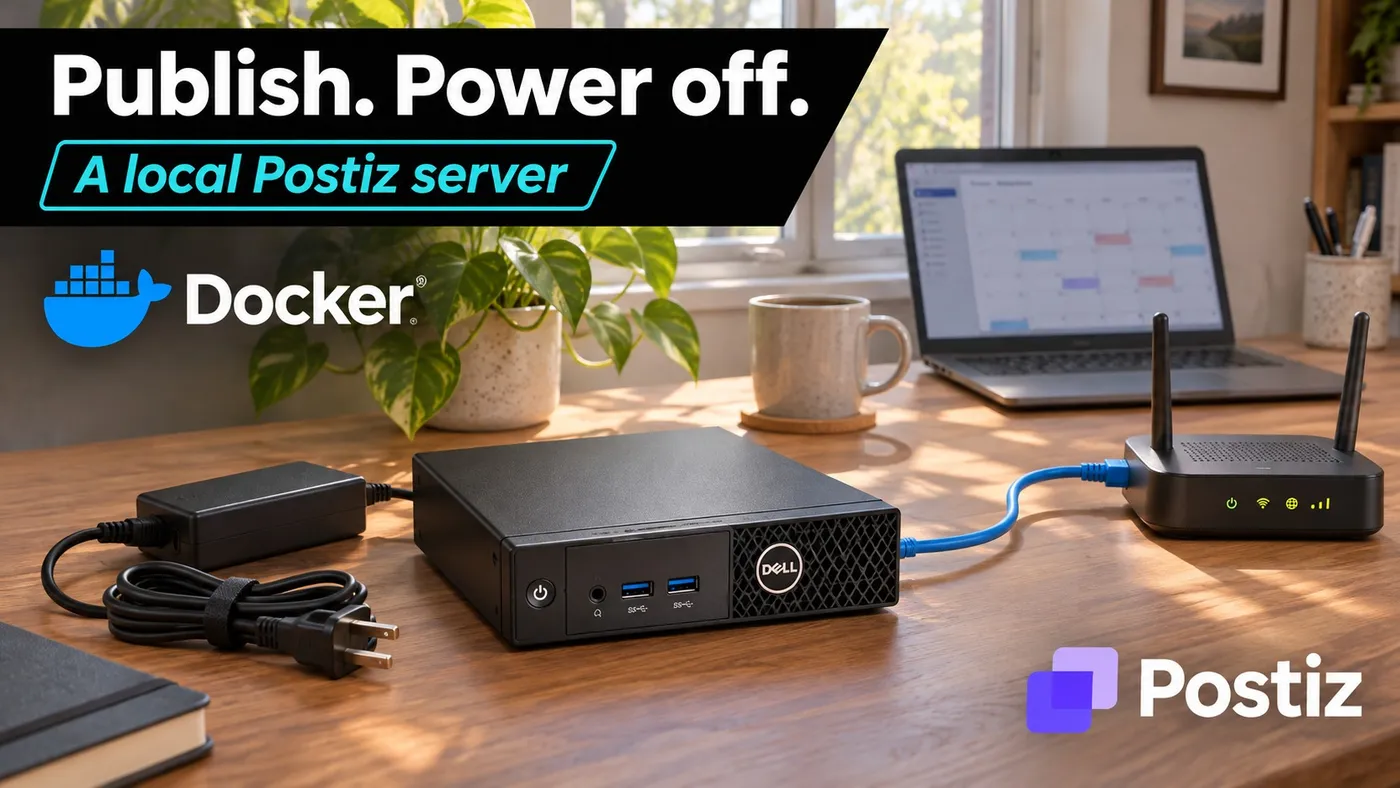
Build a Docker social scheduler on an i5 OptiPlex with 16 GB RAM: AI submissions, BIOS wake, verified publishing and guarded shutdown without a VPS.
Your social scheduler does not need to rent a computer in a data center just to publish two photographs and a paragraph about how productive you are. An old office PC can do that job, then shut down instead of spending the next twenty-three hours being an expensive power LED.
The build here is an Intel i5 OptiPlex, 16 GB RAM, at least 240 GB of SSD storage, Ubuntu Server and self-hosted Postiz in Docker. The PC wakes before a fixed publishing window. Your AI submits approved material while it is awake. Postiz publishes through the social platforms’ APIs. A separate guard checks the batch before allowing a clean shutdown.
There is one fairly important detail: a powered-off computer cannot accept API requests or publish anything. Neither Docker nor an enthusiastic AI agent has negotiated an exemption from electricity.
Validation boundary: the shutdown policy has automated tests, the examples were checked against upstream documentation, and the article is build-validated. Physical OptiPlex wake, a running Postiz deployment and real social-account publishing were not exercised for this guide. The commissioning procedure below is required before enabling unattended shutdown. This is a practical reference implementation, not a claim of a completed hardware lab test.
What this setup delivers, and what it does not
You get a local publishing application with no VPS rental, one predictable daily wake window, an API your local automation can call, and a shutdown policy that leaves the machine running when something looks wrong.
You do not get an offline social network. Publishing still requires working internet access, platform credentials, permissions and any fees imposed by that platform. AI generation may also cost money if it uses a paid service. The router remains powered, the PC consumes standby power, and someone still owns backups. Congratulations: you are that someone.
This design is for a dedicated, single-operator scheduler, not a shared server with a database, NAS, video renderer and six other people’s jobs. It uses one publishing window per day. For posts scattered across the entire day, either widen the window, add a separately tested wake controller, or keep the small PC on. Saving a few watt-hours is not worth missing a launch.
Hardware: the boring office PC is the useful part
| Part | Baseline for this guide | What to check |
|---|---|---|
| Computer | Dell OptiPlex 7060 Micro, Core i5-8500T | Working power adapter, Ethernet, accessible BIOS and automatic power-on setting |
| Memory | 16 GB DDR4 | Micro uses SODIMMs; SFF/tower memory is a different physical format |
| Storage | 240 GB SATA SSD minimum for a small queue | Health, free space, write endurance and an actual SATA cable/caddy if adding a drive |
| Network | Wired Ethernet to your existing router | DHCP reservation, local DNS and reliable outbound HTTPS |
| Backup | Separate drive or existing backup destination | App database, Temporal state, uploads, configuration and secrets |
The Amazon listing matched in our catalog is a renewed 7060 Micro with i5-8500T, 16 GB and a 512 GB SSD, not a 240 GB bundle. Keep the larger working SSD. Buying a smaller one to satisfy a tutorial would be an unusually literal approach to cost optimization.
The Kingston A400 240 GB is a separately matched 2.5-inch SATA option for a compatible machine that needs a replacement. It is not an NVMe drive. A Crucial 2 × 8 GB DDR4 SODIMM kit is relevant only if your Micro does not already have suitable memory; verify supported speed and slots. Do not buy duplicate RAM because a sidebar looks lonely.
Sixteen gigabytes is a planning budget for the scheduler stack, not a claim that this i5 can comfortably generate large AI videos or run a large local language model at the same time. Generate media on your existing workstation, then submit the finished files. For a broader hardware discussion, see the budget home-server guide.
A 240 GB SSD also needs a retention policy. For example, 20 videos at 500 MB each consume about 10 GB before database growth, container images, logs and backup staging. Alert on low space and archive completed media deliberately. Never make docker system prune --volumes your interpretation of housekeeping.
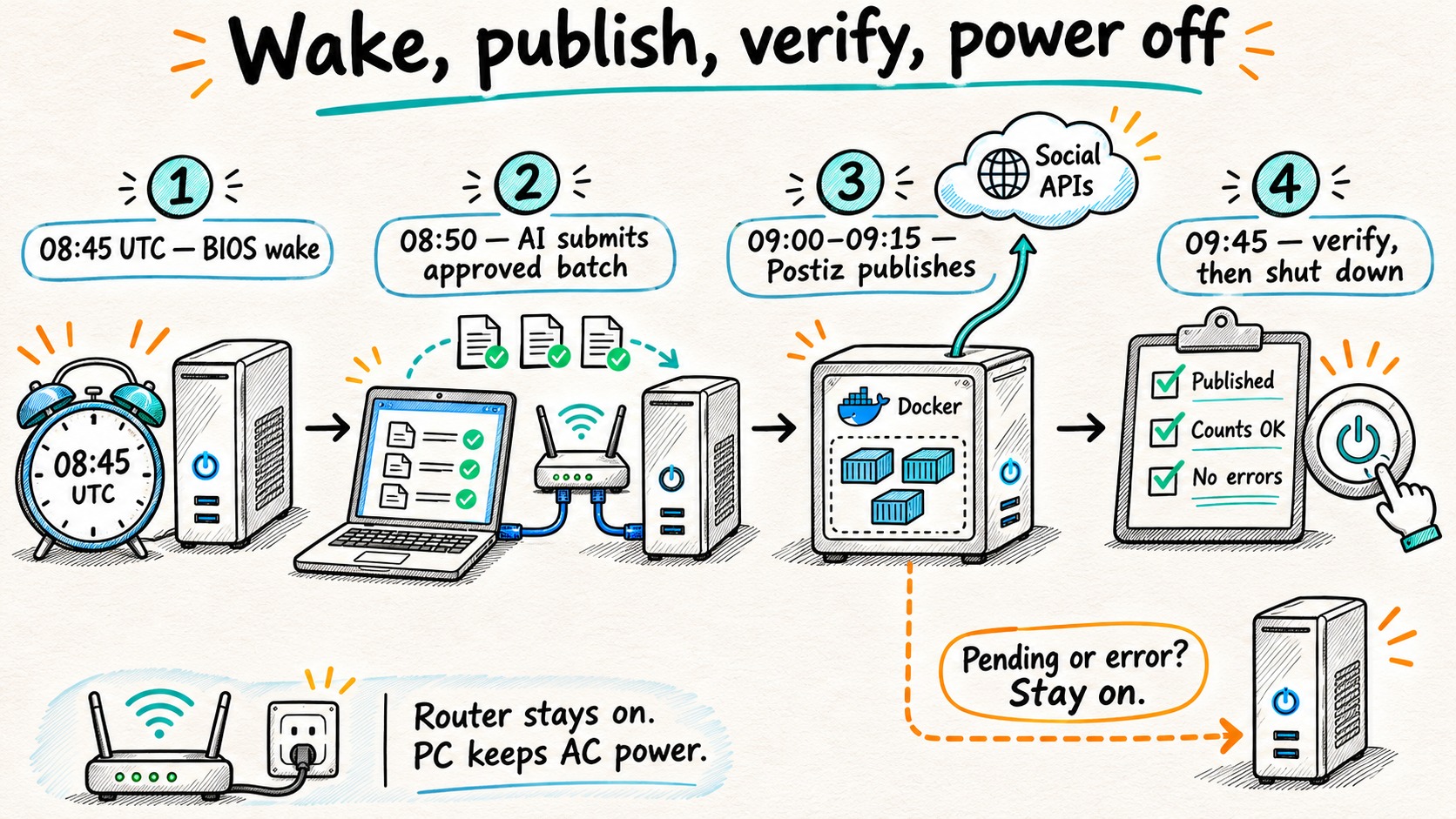
The daily contract: wake early, close intake, verify completion
| UTC time | Action | Owner |
|---|---|---|
| 08:45 | Power on from a real shutdown state | OptiPlex firmware |
| 08:45–08:50 | Boot, synchronize time, start Docker and Postiz | Ubuntu/systemd |
| 08:50–08:55 | Upload approved media and schedule the batch | Your workstation or AI orchestrator |
| 09:00–09:15 | Publish the scheduled posts | Postiz workers |
| After intake closes | Save the expected post IDs and seal the batch | Operator or trusted producer |
| 09:45 | Verify completion twice; stop services and power off if safe | Local shutdown guard |
The 15-minute boot margin and 30-minute tail are initial budgets, not performance measurements. Measure your first cold starts and largest uploads, then increase them. A video platform can take longer than a text post. It has not read your timetable.
Use UTC on this server and in API timestamps. Convert your audience’s preferred time when creating the schedule. Daylight-saving changes affect local audience time, even if UTC is behaving perfectly.
While the server is off, the producer keeps approved files and requests in its own durable outbox. It must not mark an item delivered until Postiz returns the expected post IDs. A hosted AI service cannot reach a private LAN address by wishful thinking; use a local execution bridge or a private VPN path on an awake machine.
1. Install Ubuntu and give the server a stable address
Use Ubuntu Server 24.04 LTS amd64 on the dedicated OptiPlex. Install OpenSSH, use key authentication, apply updates, and reserve an address in the router:
Host:             postiz.home.arpa
OptiPlex:         192.168.50.40
Admin workstation:192.168.50.10
Network:          trusted management LAN or dedicated server VLAN
Inbound from WAN: none for the private baseline
Create a local DNS entry for postiz.home.arpa, or add that hostname to the hosts file on each management client. Do not publish the private address in public DNS and expect social platforms to reach it.
On the Ubuntu host:
sudo timedatectl set-timezone UTC
sudo timedatectl set-ntp true
timedatectl status
sudo apt update
sudo apt install git curl jq python3 openssl ca-certificates
Confirm System clock synchronized: yes before testing timestamps. Check disk health and df -h before importing media. If you use full-disk encryption that requires a keyboard passphrase at boot, unattended publishing will stop at that prompt. Choose and test an unattended-unlock policy appropriate to the risk of stored social-account credentials.
Install Docker Engine and the Compose plugin using the official Ubuntu repository instructions, then verify:
sudo systemctl enable --now docker
sudo docker run --rm hello-world
sudo docker compose version
Use the modern docker compose command. The rest of this guide assumes /usr/bin/docker; check command -v docker before installing the service files. Docker administration is effectively privileged host access, so do not give an AI agent unrestricted membership in the docker group.
2. Deploy the current Postiz stack, including Temporal
Postiz is not just a web page plus one database. The official Compose deployment includes Postiz, PostgreSQL, Redis and a Temporal stack. Old three-container tutorials miss that dependency.
Clone upstream so the required dynamicconfig directory comes with the configuration:
sudo git clone https://github.com/gitroomhq/postiz-docker-compose /opt/postiz
cd /opt/postiz
sudo git rev-parse HEAD
sudo chmod 700 /opt/postiz
sudoedit /opt/postiz/docker-compose.yaml
The Compose source reviewed for this article was commit dd4969e5e694cd009619a0d53cff14c21104580b. Record your actual revision. Review upstream changes when upgrading instead of blindly replacing a working configuration on the morning of a campaign.
Edit the existing values in docker-compose.yaml; the following is a configuration checklist, not a replacement Compose file:
# Inside the existing postiz service environment:
MAIN_URL: 'https://postiz.home.arpa'
FRONTEND_URL: 'https://postiz.home.arpa'
NEXT_PUBLIC_BACKEND_URL: 'https://postiz.home.arpa/api'
BACKEND_INTERNAL_URL: 'http://localhost:3000'
TEMPORAL_ADDRESS: 'temporal:7233'
STORAGE_PROVIDER: 'local'
UPLOAD_DIRECTORY: '/uploads'
NEXT_PUBLIC_UPLOAD_DIRECTORY: '/uploads'
RUN_CRON: 'true'

# Replace the existing postiz ports entry, do not append another one:
ports:
  - '127.0.0.1:4007:5000'
Generate three distinct secrets with openssl rand -hex 32: JWT signing, the Postiz database password, and the Temporal database password. Put the Postiz password in both DATABASE_URL and the postiz-postgres service. Put the Temporal password in both temporal-postgresql.POSTGRES_PASSWORD and temporal.POSTGRES_PWD. Do this before initializing volumes. Changing environment text later does not automatically change an existing database user’s password.
Keep Redis, PostgreSQL, Elasticsearch and the Temporal backend off the LAN. The inspected upstream file already binds Temporal’s published ports to loopback; preserve that. Do not assume a UFW rule protects a Docker port bound to all interfaces: Docker documents that published container traffic can bypass those rules.
Use a native reverse proxy for the private management endpoint. On a host with Caddy installed, the relevant /etc/caddy/Caddyfile site is:
postiz.home.arpa {
    tls internal
    reverse_proxy 127.0.0.1:4007
}
Install Caddy using its official installation instructions, validate the file, and reload:
sudo caddy validate --config /etc/caddy/Caddyfile
sudo systemctl reload caddy
Trust this Caddy instance’s local root certificate on the admin browser and the AI producer. Caddy’s local HTTPS documentation explains that trust distribution is your responsibility for remote clients. Do not fix certificate errors by putting curl -k in the publishing script.
Now initialize the stack:
cd /opt/postiz
sudo docker compose config --quiet
sudo docker compose pull
sudo docker compose up -d --wait --wait-timeout 600
sudo docker compose ps
sudo docker compose logs --tail=100 postiz temporal
Create the initial account at https://postiz.home.arpa, then disable further registration using the deployment’s DISABLE_REGISTRATION setting. Check the configuration reference for its authentication implications. Keep secrets out of screenshots and Git.
Before unattended operation, pin the image versions or digests you actually commissioned. sudo docker image inspect ghcr.io/gitroomhq/postiz-app:latest --format '{{index .RepoDigests 0}}' shows a pulled digest you can record in Compose. Do not pull new images during each wake window. The job is to publish content, not discover a migration at 08:59.
3. Connect one platform before attempting all of them
Use a test Bluesky account for the first end-to-end exercise. Postiz’s provider configuration overview lists Bluesky among the connections configured by user credentials rather than deployment-level developer-app keys. Create a dedicated app password in Bluesky, then connect its service URL, handle and app password through Postiz.
Other platforms can require developer registration, approved permissions, specific account types, OAuth callbacks, public media URLs or paid API access. Self-hosting Postiz does not waive those requirements. Read the provider-specific guide before buying hardware for a platform you cannot authorize.
There are two different network paths:
- Administration: browser and AI producer access Postiz on your private network.
- Publication: Postiz makes outbound requests to the provider, and some providers fetch media or call back to a public HTTPS endpoint.
The private home.arpa hostname is not a public upload origin. Begin with text, then test a small image on the selected provider. If the provider needs public media, configure a suitable public storage origin, such as Postiz’s supported R2 storage, or a properly secured public media endpoint. That can still avoid a VPS, but storage/domain/egress charges and availability requirements remain. If the provider needs your sleeping host to serve callbacks or delayed media fetches, this shutdown design is not suitable until that dependency is moved or the wake window is extended.
Do not open the whole Postiz administration UI to the internet just to make one image reachable. And do not disable SSRF checks globally as your first response to a failed upload.
4. Let the AI submit an approved batch through the API
Use Postiz’s API key from the instance settings, stored by the producer as a secret. The self-hosted reverse-proxy route in this deployment is https://postiz.home.arpa/api/public/v1. It is not the hosted Postiz cloud API.
On the producer, set these values without placing the real key in shell history:
export POSTIZ_BASE='https://postiz.home.arpa/api/public/v1'
read -rsp 'Postiz API key: ' POSTIZ_API_KEY
echo
export POSTIZ_API_KEY
curl --fail-with-body --silent --show-error \
  -H "Authorization: $POSTIZ_API_KEY" \
  "$POSTIZ_BASE/integrations" > integrations.json
jq . integrations.json
The Authorization value is the key itself, not an invented Bearer prefix. Select the connected channel ID from the response. Never let the model guess it.
First save a draft with type: "draft" and inspect it in the UI. After approval, use the documented scheduling payload. For example, save this as approved-post.json, replacing the integration ID and future date:
{
  "type": "schedule",
  "date": "2026-11-10T09:00:00Z",
  "shortLink": false,
  "tags": [],
  "posts": [{
    "integration": {"id": "REPLACE_WITH_CONNECTED_CHANNEL_ID"},
    "value": [{
      "content": "The local publishing server is awake. Unlike me, it has a documented shutdown procedure.",
      "image": []
    }],
    "settings": {"__type": "bluesky"}
  }]
}
Submit only while the server is awake and the planned publication falls inside the accepted window:
curl --fail-with-body --silent --show-error \
  -X POST "$POSTIZ_BASE/posts" \
  -H "Authorization: $POSTIZ_API_KEY" \
  -H 'Content-Type: application/json' \
  --data-binary @approved-post.json > scheduled.json
jq -e 'type == "array" and length > 0 and all(.[]; .postId and .integration)' scheduled.json
A successful response contains post IDs, not proof of publication. Keep the response with the producer’s job ID. If a timeout leaves the outcome uncertain, inspect Postiz before resubmitting: blindly retrying a creation request can duplicate a post. Use a durable producer ledger with states such as approved, submitting, accepted and needs_reconciliation.
For media, upload the finished file first:
curl --fail-with-body --silent --show-error \
  -H "Authorization: $POSTIZ_API_KEY" \
  -F 'file=@approved-image.jpg' \
  "$POSTIZ_BASE/upload" > uploaded.json
jq '{id, path, status}' uploaded.json
Insert the returned id and path into the post’s image array. The upload reference distinguishes synchronous uploads from optional background media adjustment. Wait for any processing to finish before sealing the batch; the guard below does not inspect transcoding jobs. The AI should submit approved text and files, not retain root access or invent a new shutdown policy in a moment of creative confidence.
5. Make the OptiPlex wake from shutdown
Enter firmware setup with F2 during boot. The 7060 Micro setup guide documents Auto On Time under power management. Set the required days and a daily time corresponding to 08:45 UTC in the clock convention your firmware actually uses.
On a Linux-only host, inspect timedatectl and sudo hwclock --show. Keep the hardware clock and OS convention consistent. Test the BIOS alarm a few minutes ahead from a full sudo systemctl poweroff, not merely suspend. Check the resulting boot time with journalctl --list-boots. Repeat after an ordinary reboot and an overnight shutdown.
Leave AC power connected. A smart plug cutting power after shutdown defeats the firmware alarm. Configure AC recovery separately for outages, and test it. A UPS can help with short interruptions, but it must have the correct mains voltage and capacity for your installation.
The fixed BIOS alarm is intentionally independent of the Postiz database. It wakes every configured day, even if no posts exist. For irregular multiple windows, an already-on LAN controller can send Wake-on-LAN packets after you verify firmware, NIC, wired connection and S5 support. Do not assume any router provides programmable WoL, and do not expose a WoL service to the WAN. A cron job on the powered-off OptiPlex cannot wake that same machine.
6. Start the stack at boot and guard the shutdown
Download the companion files: stack service, shutdown service, timer, and Python guard. Read them before installing them as root.
sudo install -d -m 755 /usr/local/lib/postiz-power
sudo install -d -m 700 /etc/postiz-power
# Run these from the directory containing the four downloaded files:
sudo install -m 644 power_guard.py /usr/local/lib/postiz-power/power_guard.py
sudo install -m 644 postiz-stack.service postiz-poweroff.service \
  postiz-poweroff.timer /etc/systemd/system/
sudoedit /etc/postiz-power/config.json
The guard configuration is:
{
  "baseUrl": "http://127.0.0.1:4007/api/public/v1",
  "composeDir": "/opt/postiz"
}
Use sudoedit /etc/postiz-power/api-key to save the same API key as a single line, then sudo chmod 600 /etc/postiz-power/api-key. The guard talks over loopback; the producer still uses trusted HTTPS.
After the producer has finished all submissions and media work, stop further writes. No UI edits, uploads, new drafts, background generation or second agent may run during sealing and shutdown. This is an explicit single-writer operating rule, not a magical distributed lock. If you cannot enforce it, keep the host on.
Create /etc/postiz-power/batch.json for the actual UTC day. Use every postId returned by all requests in the batch:
{
  "date": "2026-11-10",
  "sealed": true,
  "postIds": ["ACTUAL_POST_ID_1", "ACTUAL_POST_ID_2"],
  "nextWake": "2026-11-11T08:45:00Z"
}
Do not copy yesterday’s manifest. A trusted producer may generate this file after receiving all responses; an operator can install it after review. Empty batches intentionally keep the machine on in this reference policy. They require an explicit operational decision, not an inference that an empty API response means everything worked.
The guard uses Postiz’s date-range listing endpoint and checks a seven-day lookback through the next wake. Before adopting that horizon, resolve older failed/queued jobs and confirm your release returns the full requested range. If a future version paginates it, implement pagination before using this guard.
It refuses shutdown when:
- today’s batch is missing, unsealed, empty or has duplicate IDs;
- the clock is outside 09:45–10:00 UTC or the next wake is not tomorrow at 08:45 UTC;
- any returned post is queued, failed, has an error or has an unknown state;
- any expected ID lacks
PUBLISHEDstate and a publication URL; - either API read fails, or the response or manifest changes during a 60-second quiet interval;
/etc/postiz-power/MAINTENANCEexists.
It checks application-reported completion, not independent provider verification, media fetches, every possible background task or posts outside the inspected range. Confirm real provider URLs during commissioning. The design assumes the initial backlog is clean and all new work is inside the daily contract.
At 09:45, run the default dry run first:
sudo python3 /usr/local/lib/postiz-power/power_guard.pyOnly after successful physical wake and publishing tests, arm shutdown and enable the services:
sudo touch /etc/postiz-power/ENABLE_POWEROFF
sudo systemctl daemon-reload
sudo systemctl enable --now postiz-stack.service
sudo systemctl enable --now postiz-poweroff.timer
systemctl list-timers postiz-poweroff.timer
The timer makes one attempt per day. Persistent=false prevents a missed shutdown timer from firing unexpectedly after a later manual boot. On success the guard stops the application first, then the remaining Compose services, and requests OS poweroff. On an error it returns failure instead of issuing a poweroff. If a stop command fails, some services may already be stopped; inspect and recover them rather than assuming publication remains healthy.
Keep a maintenance lock while editing or debugging:
sudo touch /etc/postiz-power/MAINTENANCE
journalctl -u postiz-stack -u postiz-poweroff --since today
# Remove only after maintenance and media processing have finished:
sudo rm /etc/postiz-power/MAINTENANCE
The downloaded guard is deliberately fixed to this timetable. Changing only the BIOS time or timer is insufficient: update the guard’s allowed window, expected next wake, batch producer and monitoring together, then repeat the tests.
7. Commission it before trusting the power button
Run a test account, a harmless image and a short text post through these cases. Record actual results rather than ticking boxes because the configuration looks professional.
| Test | Expected behavior |
|---|---|
| Cold boot from full shutdown | Firmware wakes the host early enough; Compose reaches healthy state |
| Valid scheduled text and image | Both appear on the intended account with the expected timestamp and media |
| Revoked test credential | Post fails; guard refuses shutdown |
| Missing expected ID or API outage | Guard refuses shutdown |
| Extra queued post before tomorrow’s wake | Guard refuses shutdown |
| Changed or stale manifest | Guard refuses shutdown |
| Producer loses connection after submit | Reconcile existing post before retrying; no blind duplicate creation |
| Router or internet fails during the window | Machine stays on for recovery; check overdue-post behavior in your deployed release |
| Reboot after a clean stop | Boot service explicitly brings the Compose project up again |
| AC outage and restoration | Observe recovery behavior; do not assume yesterday’s BIOS alarm is replayed |
Overdue posts deserve special attention. Persistent workflow storage does not promise your campaign will be published at the original time after the machine missed that time. Test your release’s recovery behavior and decide when a late post must be canceled rather than sent. Keep an independent reminder or monitor on an already-on device; a sleeping server is not a credible witness to its own failed wake-up.
The automated tests accompanying this guide exercise completion, failure, unknown states, missing IDs, stale batches and time boundaries. They do not prove BIOS behavior or platform acceptance. Docker Desktop was not running in the authoring environment, so no full container integration test is claimed.
Back up the scheduler, not just the captions
Postiz’s database holds account and scheduling state; uploaded files live in persistent storage; Temporal has its own persistence. Preserve the named volumes, Compose file, dynamicconfig, pinned image references and secrets. Protect the backup as credential-bearing data.
For a simple cold backup, set the maintenance lock, stop the entire Compose project cleanly, back up its persistent volumes and configuration to another device, then start it again. A live copy of PostgreSQL’s files is not a substitute for a consistent database backup. Test restoration on an isolated host without publishing access before reconnecting accounts; restoring a queue twice is a surprisingly efficient way to annoy your audience.
For updates, use a maintenance day, make a recoverable backup, review the Postiz migration notes, test a small batch, then restore the shutdown schedule. Do not point two recovered copies at the same social accounts and hope they work out who is in charge.
Is this cheaper than a VPS?
Use measured whole-system power, including standby, rather than CPU TDP. For an illustrative 35 W running draw, 1 W standby and one hour on per day:
daily energy = (35 W × 1 h + 1 W × 23 h) / 1000
             = 0.058 kWh
annual energy = 0.058 × 365 = 21.17 kWh
Those are hypothetical inputs, not measurements of the listed OptiPlex. Multiply by your own tariff, then add hardware amortization, backup storage, any domain/storage/API fees and maintenance time. If the router was already on, its baseline draw is not a new saving; if you bought another controller just to wake this PC, count it.
The architecture makes sense when you already own the machine, publish in a small number of windows and can tolerate a failed window that needs attention. If your business needs reliable posting around the clock while you are away, a small always-on host or managed service may be the cheaper decision once your time enters the spreadsheet.
Local-first means you own the application and its recovery path. It does not mean social platforms stop being external dependencies, or that the machine can publish from the electrical equivalent of a nap.
Keep reading
Related guides

Gemma 4 Audio Local Inference: What Works Offline and What Does Not
Test Gemma 4 audio locally for transcription and translation, with realistic runtime, format, memory and latency limits.

LoRa vs LoRaWAN vs Meshtastic: choose a network for property sensors
Choose a radio architecture for outbuildings and property sensors. Compare LoRaWAN, Meshtastic and custom LoRa links by data path and failure modes.

AI Energy Management With Home Assistant and EMHASS
Use EMHASS with solar forecasts, dynamic tariffs, EV charging constraints and deterministic Home Assistant fallbacks.