Build an Offline Care Assistant for Older Adults or Pets
Combine local voice, fall signals, medication reminders and family alerts without turning a home lab into a medical device.
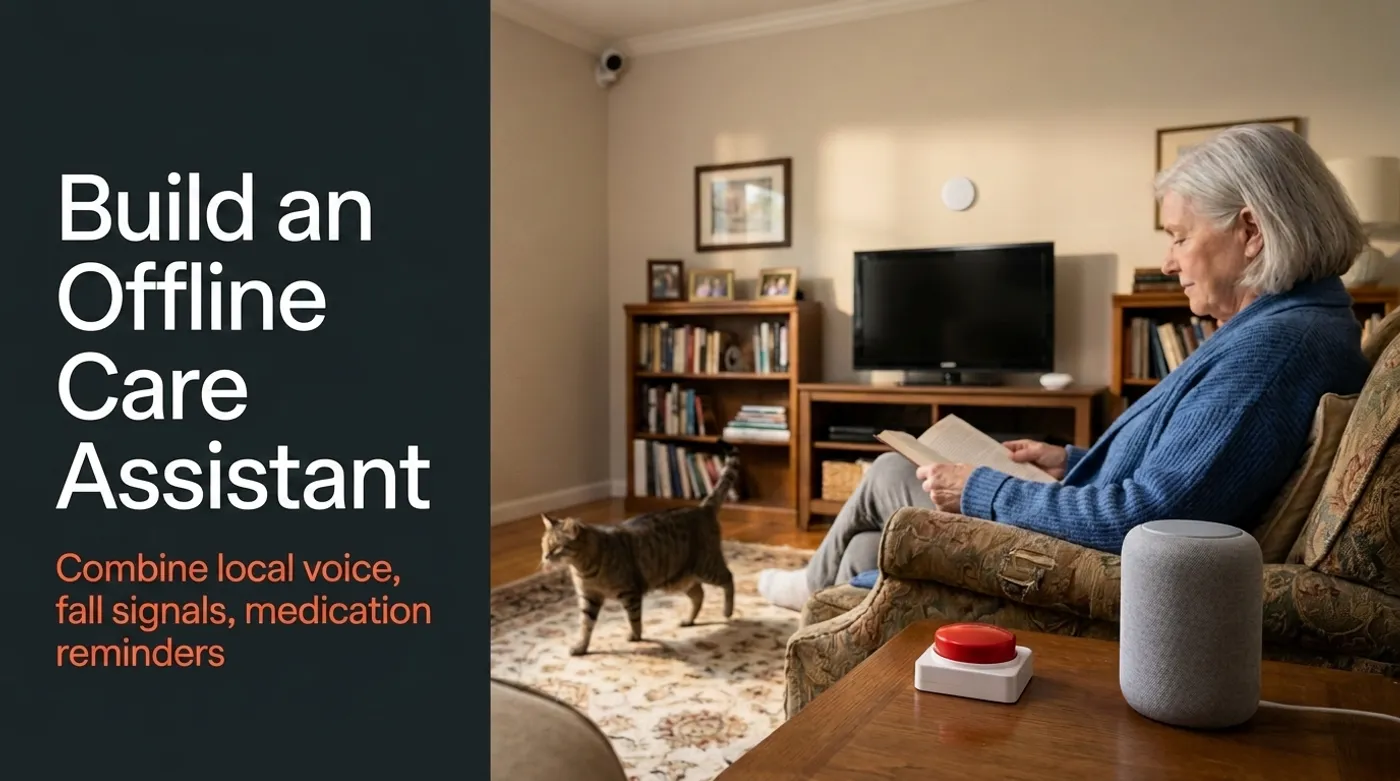
Combine local voice, fall signals, medication reminders and family alerts without turning a home lab into a medical device.
An offline care assistant can remind someone about medication, notice that a normal routine did not happen, and help a family check in after a possible fall. For a pet, it can report whether food was taken, activity changed, or a scheduled reminder was missed. Those are modest jobs, but modest is appropriate when the system is observing health and safety.
What it cannot do is turn a hobby camera and a language model into a certified medical monitoring service. A false negative can leave someone without help. A false positive can panic a family. The architecture has to assume that every sensor and every model will eventually be wrong.
The Care Pipeline
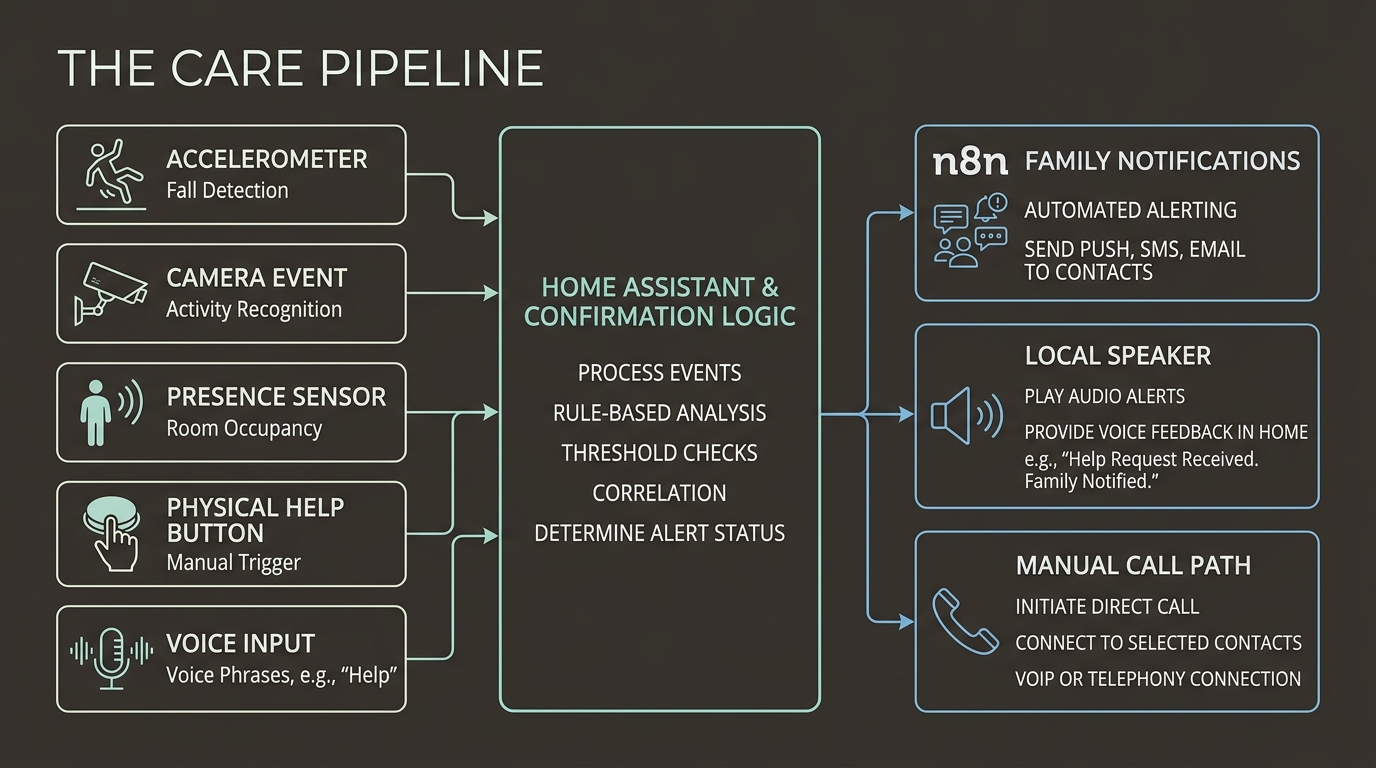
A practical local-first design separates detection, confirmation, communication, and escalation:
Camera event / accelerometer / no-motion rule / help button
  -> Home Assistant deterministic confirmation
  -> local voice check-in
  -> resident response or cancel button
  -> n8n notification workflow
  -> family push, SMS or phone call
  -> human decides whether emergency services are needed
Home Assistant should own the timers, entity states, sensor correlation, and local alarms. n8n can format messages, notify several relatives, wait for acknowledgment, and create an event record. Gemma 4 can understand a spoken answer or summarize the evidence.
None of those components should be allowed to diagnose an injury or change medication instructions.
The CDC treats falls among older adults as a serious health problem and recommends evidence-based prevention and clinical assessment. A home automation project is an extra communication layer, not a replacement for the CDC STEADI guidance or professional care.
Detecting a Possible Fall
There are three realistic signal families.
Wearable accelerometer
A wrist device, pendant, phone, or dedicated wearable can detect a rapid acceleration followed by an impact or unusual stillness. It stays with the person and can work in rooms without cameras.
It can also be left on a charger, worn loosely, dropped, or ignored. Treat battery state and last-seen time as part of the signal:
possible_fall =
  impact_detected
  AND wearable_on_body
  AND no_cancel_received
The system should announce what it detected and offer an easy cancel path.
Camera-based pose event
A local vision service can flag a transition from standing to floor-level posture. Keep inference on the local server and send Home Assistant only a structured event:
{
  "camera": "living_room",
  "event": "possible_fall",
  "confidence": 0.84,
  "observed_at": "2026-08-10T14:32:11-04:00"
}
A score of 0.84 is not medical certainty. Furniture, exercise, picking something up, a large dog, blankets, and camera occlusion can all confuse a model.
Never put cameras in bathrooms or other private spaces just to improve coverage. Use a waterproof help button, door contact, mmWave sensor, or wearable there. Privacy is not a bug to be fixed with a wider lens.
No-motion and routine anomalies
If the kitchen and hallway usually show activity by 9:30 AM, no movement can trigger a check-in. This is weaker than an impact signal, but useful when combined with context:
No common-area presence by 09:30
AND bedroom door opened
AND phone remains home
THEN ask for a voice or button check-in
Routine detection should have generous windows. People sleep late, leave through different doors, read quietly, or simply change habits. The goal is to ask, not accuse the morning of becoming an emergency.
Confirmation Before Escalation
Use stages:
- Play a local chime and ask, “Are you okay?”
- Wait for a spoken response, physical cancel button, or wearable acknowledgment.
- If the answer is clear, log the check-in and stop.
- If there is no response, notify the first family contact with sensor context.
- If nobody acknowledges, notify the backup contact and initiate a family call path.
Gemma 4 audio can help classify responses such as “I am fine,” “I need help,” or an unclear utterance. Google’s Gemma audio documentation covers local speech understanding and transcription paths.
Home Assistant’s Assist pipeline can provide the local wake-word, speech-to-text, intent and text-to-speech path. Keep the care-specific response classifier behind that ordinary voice pipeline so lights and other household commands do not share emergency permissions.
Keep the action vocabulary tiny:
allowed_responses:
  - okay_cancel
  - need_family_help
  - unclear
An unclear response escalates to a person. It does not let the model improvise a diagnosis.
Medication Reminders Without Practicing Medicine
The medication schedule must come from a person, caregiver, doctor, pharmacist, or existing care plan. Store it as structured data:
medications:
  - id: morning_prescription
    reminder_time: "08:00"
    label: "Morning medication"
    requires_acknowledgment: true
    family_escalation_after_minutes: 45
Do not store the dosage in the language-model prompt unless there is a concrete need. The assistant can say the label that the household approved. It must never infer a dose, suggest taking a missed dose, or move the schedule because breakfast was late.
The National Institute on Aging recommends following medication instructions and using tools such as timers, charts, calendars, and pill organizers to help take medicines on time. It also advises checking with a healthcare professional before stopping or changing medication. The automation should reinforce that medication safety guidance, not compete with it.
A useful flow:
08:00 local reminder
  -> speaker announces approved label
  -> button or voice acknowledgment
  -> repeat once after 15 minutes
  -> family notification after 45 minutes without acknowledgment
An acknowledgment means someone pressed a button or answered. It does not prove that medication was swallowed correctly. Phrase family alerts honestly: “No acknowledgment received,” not “Medication missed.”
Home Assistant and n8n Responsibilities
Keep safety-relevant state in Home Assistant:
- sensor availability;
- panic-button events;
- local timers;
- voice-satellite availability;
- resident or pet presence;
- notification acknowledgment;
- UPS and network health.
Use n8n after Home Assistant creates a confirmed workflow event. The official n8n self-hosted AI starter kit demonstrates a local stack with workflow automation, Ollama and a vector store, but n8n also warns that the kit is for testing and should be hardened before production use.
An n8n escalation can:
Webhook from Home Assistant
  -> redact unnecessary camera metadata
  -> create concise event summary
  -> notify contact A
  -> wait for acknowledgment
  -> notify contact B
  -> record who responded
A failed n8n container must not suppress the local chime, physical button, or Home Assistant alert. The house still needs a way to ask for help when the workflow service or its database is unavailable.
Calling Family Locally
“Offline” needs an honest definition. Detection, confirmation, voice processing, and local alarms can work without internet. Calling a relative requires a communication network.
Options include:
- a local SIP/PBX server with an outbound provider;
- a cellular modem or LTE gateway;
- mobile push notifications when internet is available;
- a loud local alarm that alerts another person in the house.
The call script should identify the event and location without claiming certainty:
This is the home care system.
A possible fall was detected in the living room.
No local acknowledgment was received.
Please check the Home Assistant alert and contact the resident.
Do not automatically call emergency services from an uncertified home automation. Dispatch rules and legal requirements vary. The safer design is family notification plus a manual call, as described in Emergency Home Automation Without False Alarms.
Adapting the Same Architecture for Pets
The pet version can reuse the plumbing with lower-stakes actions:
- detect whether a pet visited the food area;
- remind the household about approved medication times;
- notice unusual inactivity;
- alert when a door or gate opens;
- provide a local two-way voice check;
- summarize activity without uploading household video.
Do not let the model decide that an animal is sick from posture or inactivity. It can report observations: “No kitchen-zone activity since 7 AM.” A person or veterinarian interprets them.
Separate human and pet profiles. A dog lying on the floor is normal. A human pose detector should not repeatedly declare a medical incident because the Labrador has mastered napping.
Network and Privacy Boundaries
Use separate network zones:
Servers:       10.20.0.0/24
Cameras:       10.30.0.0/24
IoT sensors:   10.40.0.0/24
Voice clients: 10.50.0.0/24
Allow:
- cameras to reach only the local NVR or vision service;
- voice clients to reach only the local Assist pipeline;
- Home Assistant to call the n8n webhook;
- n8n to reach approved notification endpoints;
- family VPN clients to reach the dashboard.
Retain structured events longer than video. A timestamp, room, signal type, acknowledgment, and response time may be enough for troubleshooting. Delete clips quickly unless the household explicitly agrees that they are needed.
Everyone being monitored should understand the system and consent where they are able. Local storage reduces cloud exposure. It does not erase the social and legal obligations of recording people at home.
Failure Tests That Matter
Test the uncomfortable cases:
- the camera is blocked;
- the wearable battery is dead;
- the person falls outside camera view;
- a pet triggers the pose model;
- speech is unclear;
- the panic button is unreachable;
- n8n is down;
- the internet is down;
- the first family contact does not answer;
- Home Assistant restarts during a reminder;
- the UPS battery is exhausted.
Run scheduled test alerts with the family. Confirm that contact numbers, notification permissions, and escalation order are current. A workflow that nobody has tested is just a diagram with confidence issues.
The Standard for Success
The assistant is useful when it makes check-ins easier, preserves privacy, and gives relatives better context. It is unsafe when the household starts trusting it as the only path to medication, fall detection, or emergency response.
Physical buttons and ordinary phone access remain part of the system. Professional medical advice and formal monitoring remain where they are needed. Local AI can help with language and summaries; timers and limits belong in deterministic automation, and serious decisions stay with people.
Keep reading
Related guides
Build an Offline Multimodal Voice Assistant for Home Assistant
Build a local Home Assistant voice pipeline with wake word, speech, Gemma 4 context, allowlisted actions and spoken responses.
AI Energy Management With Home Assistant and EMHASS
Use EMHASS with solar forecasts, dynamic tariffs, EV charging constraints and deterministic Home Assistant fallbacks.
Gemma 4 Audio Local Inference: What Works Offline and What Does Not
Test Gemma 4 audio locally for transcription and translation, with realistic runtime, format, memory and latency limits.