Why Local Home Automation Gets Better With a Local AI Layer
Use Home Assistant, Zigbee, and a local Gemma 4-style model to make home automation more private, resilient, and useful.
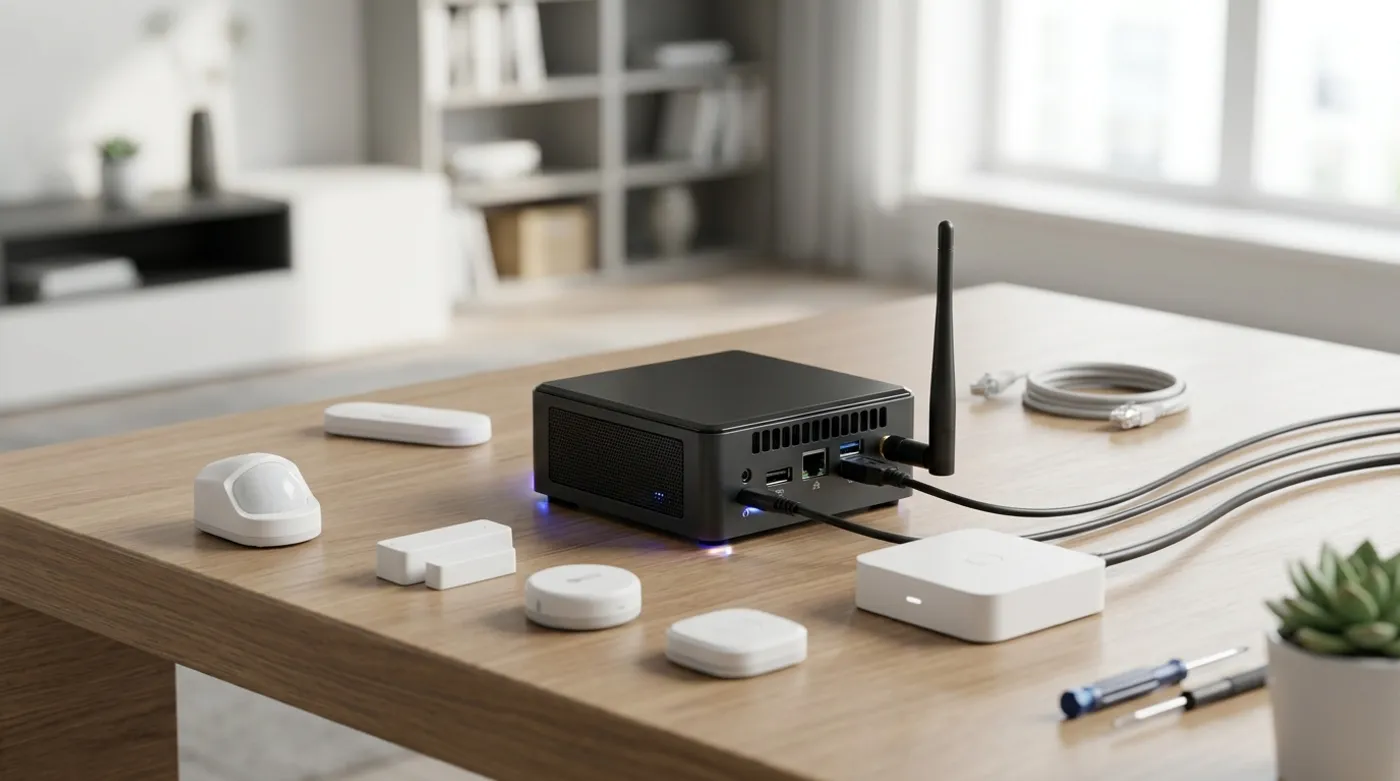
Use Home Assistant, Zigbee, and a local Gemma 4-style model to make home automation more private, resilient, and useful.
Home automation is useful before AI enters the room. Lights turning on at the right time, HVAC reacting to real occupancy, leak sensors shutting down risky routines, and doors triggering local alerts are already worth doing. The problem is that many smart homes are built backwards: cloud accounts first, automations second, local reliability last.
A local-first setup flips that order. Home Assistant becomes the control plane, Zigbee or Z-Wave devices keep the house responsive without vendor relays, and a local Gemma 4-style model can sit above the automations as a reasoning layer. The model should not directly own the house. It should help interpret intent, propose routines, summarize state, and call well-defined tools that you can audit.
What Can I Use Gemma 4 For in a Smart Home?
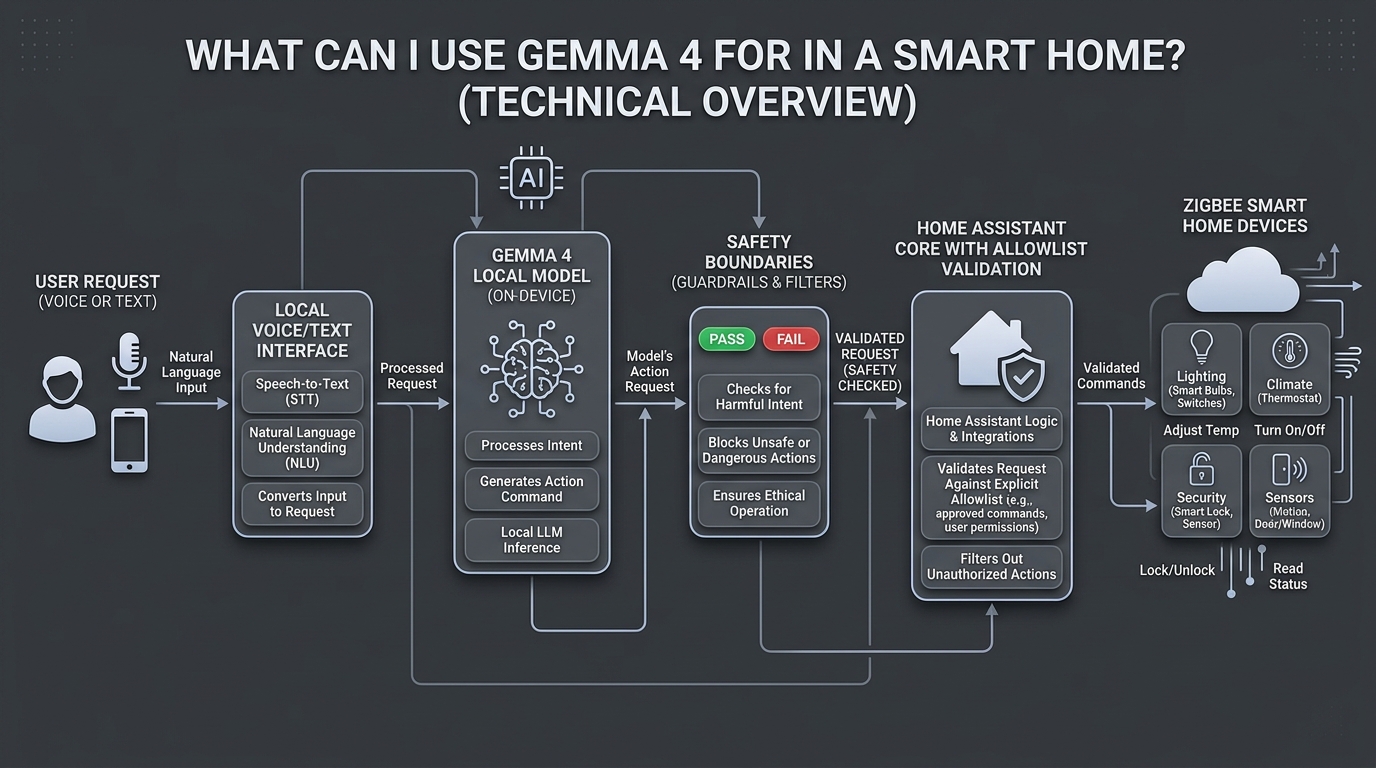
The search results around “home automation Gemma 4” are already leaning toward the same question: can an open local model become the private assistant layer for Home Assistant? The useful answer is yes, but only if the architecture is constrained.
Good use cases:
- turn natural language into a specific Home Assistant service call
- explain why an automation fired
- summarize sensor state across rooms
- suggest automations based on patterns
- classify intent from short voice commands
- draft YAML or UI automation logic for review
- answer household questions from local documentation
Bad use cases:
- letting the model unlock doors without a narrow confirmation path
- letting it run arbitrary shell commands
- exposing every Home Assistant entity to a model with no allowlist
- using it as the only logic layer for safety-critical automations
The model should be treated like a smart interpreter, not the root authority. Your automations should still be deterministic. The local model helps people interact with them in a more natural way.
If your automation plan includes alarms, sirens, panic buttons, or camera snapshots, design that path separately. I would use a confirmation-first pattern like the one in Emergency Home Automation Without False Alarms instead of letting a model or one sensor event decide what counts as an emergency.
The Local-First Architecture
A practical local automation stack has layers:
Users
  -> voice or text input
  -> local intent layer with Gemma 4-style model
  -> Home Assistant Assist or custom tool bridge
  -> Home Assistant automations and scripts
  -> Zigbee/Z-Wave/Matter/LAN devices
In this design, Home Assistant remains the source of truth. The local model receives a limited view of the home, such as room names, safe scripts, and entity aliases. It does not need direct access to every raw device.
For example, expose a script called:
script.good_night_downstairsDo not expose every lock, alarm, camera, and switch as unrelated raw tools. A curated script can turn off lights, lower media volume, check that doors are locked, and set the thermostat within safe bounds. The model only has to choose the script, not improvise the whole sequence.
Privacy Is the Obvious Benefit, but Not the Only One
Privacy is the headline. Local voice and local reasoning mean fewer household commands, room names, habits, and device states leave your network. That matters because smart home data is intimate. It reveals when people wake up, when they leave, what rooms they use, and sometimes whether a door was unlocked.
But reliability is just as important. A local automation should still work when:
- the internet is down
- a vendor cloud has an outage
- a subscription changes
- an app update breaks a mobile workflow
- DNS to a vendor endpoint fails
That is the real benefit of local-first home automation. The house keeps behaving like a house, not like a bundle of remote API calls.
Zigbee Is Still the Practical Device Layer
Wi-Fi devices are convenient, but they often bring vendor apps, cloud onboarding, and noisy network behavior. Zigbee is boring in a good way. A Sonoff Zigbee 3.0 USB Dongle Plus attached to the Home Assistant host can coordinate local sensors, buttons, plugs, and bulbs without every device needing your main Wi-Fi credentials.
A representative setup:
- Home Assistant host:
10.20.0.20 - Zigbee coordinator: Sonoff Zigbee 3.0 USB Dongle Plus
- IoT VLAN:
10.40.0.0/24 - Main LAN:
10.10.0.0/24 - Local AI host: same server or separate mini PC at
10.20.0.30
Zigbee devices do not need IP addresses. They join the coordinator network. That keeps the Wi-Fi cleaner and makes isolation simpler. IP-based devices can still live on the IoT VLAN, but the core automations should not depend on each bulb and sensor calling a vendor cloud.
Camera-heavy homes deserve even stricter treatment. If RTSP cameras or an NVR are part of the setup, put the camera design through the same local-first lens and use a dedicated guide like How to Isolate IP Cameras on a VLAN Without Breaking Local Recording before mixing cameras with laptops, phones, and NAS storage.
Where the Local Model Fits
The model layer should sit between human input and controlled Home Assistant actions. It can receive a prompt like:
The user said: "make the downstairs comfortable for movie night."

Allowed actions:
- script.movie_night_downstairs
- script.good_night_downstairs
- script.pause_living_room_automation
- climate.set_temperature for living_room only, range 68F to 74F

Return one action with arguments.
The important part is the allowlist. You are not asking the model to discover the house. You are giving it a safe menu.
This is also where Gemma 4-style multimodal and agentic capabilities can become interesting, but the home should remain conservative. If the model can reason over camera snapshots, occupancy states, or energy charts, keep that analysis read-only until you have reviewed the failure modes.
Automation Suggestions Without Giving Up Control
One of the best uses for a local model is not direct control. It is suggestion.
Examples:
- “The hallway motion sensor triggers between 11:30 PM and 2:00 AM most nights. Consider a dim night-light automation.”
- “The office heater smart plug draws power after the room is empty. Consider a 20-minute vacancy shutoff.”
- “The garage door sensor stays open longer on trash pickup mornings. Consider a reminder, not an automatic close.”
That last distinction matters. A good home automation system does not automate every possible thing. It automates things where the failure mode is acceptable.
Failure Modes to Design Around
Local AI does not remove failure modes. It changes them.
- Misheard command: voice input maps to the wrong action.
- Over-broad tool access: the model can control too many entities.
- Ambiguous room names: “turn off the office” could mean lights, plugs, computer, or climate.
- Unsafe automation: a routine affects locks, heaters, garage doors, or alarms without confirmation.
- Model drift after upgrade: responses change enough to break assumptions.
The fix is boring architecture:
- expose scripts instead of raw device access
- require confirmation for locks, doors, alarms, and high-power loads
- keep a manual fallback
- log every AI-chosen action
- test with harmless devices first
Product Categories Worth Curating
This kind of setup has a real hardware bill, but it does not have to be extravagant:
- Intel N100 mini PC or similar low-power host
- Home Assistant Green if you want an appliance-style start
- Sonoff Zigbee 3.0 USB Dongle Plus for local Zigbee
- Zigbee motion sensors for occupancy
- Zigbee temperature and humidity sensors
- smart plugs with energy monitoring for safe measurement
- a small UPS if the server also runs important automations
Do not buy fifty devices first. Buy the coordinator, two sensors, one smart plug, and prove the system is reliable. A small local system that works every day is better than a large cloud-dependent system that impresses guests once and annoys everyone later.
The Practical Benefit
The benefit of local home automation is not that it feels futuristic. It is that the house becomes more predictable. Lights, climate, security, and alerts continue working locally. A model like Gemma 4 can make interaction more natural, but the value comes from the architecture underneath it: local control, narrow permissions, and automations that still make sense when the internet disappears.
Keep reading
Related guides
Reduce Food Waste With Local OCR, Private RAG and Fridge Photos
Turn fridge photos into a private local inventory with OCR, recipe retrieval and honest date-label alerts that require confirmation.
Offline Voice Control for Home Assistant With Gemma 4
Design a private voice control stack for Home Assistant using local speech, Piper output, and a constrained Gemma 4 action layer.
AI Energy Management With Home Assistant and EMHASS
Use EMHASS with solar forecasts, dynamic tariffs, EV charging constraints and deterministic Home Assistant fallbacks.