Reduce Food Waste With Local OCR, Private RAG and Fridge Photos
Turn fridge photos into a private local inventory with OCR, recipe retrieval and honest date-label alerts that require confirmation.
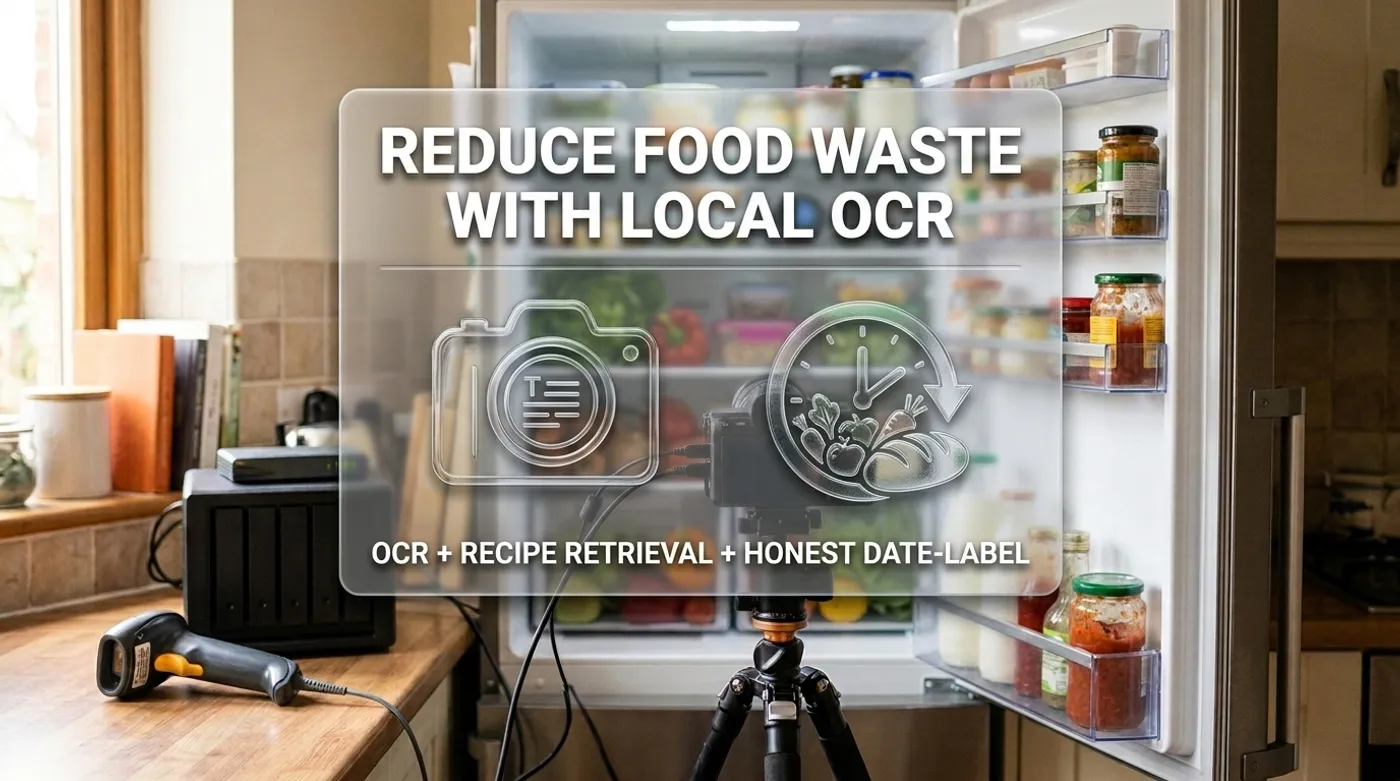
Turn fridge photos into a private local inventory with OCR, recipe retrieval and honest date-label alerts that require confirmation.
Most food-inventory apps fail for a boring reason: maintaining the inventory becomes more work than checking the refrigerator. One photo feels easy. Turning it into six correct items, two reliable dates, an unlabeled bowl of leftovers, and the spinach hiding behind the milk is the real job.
Local OCR and a multimodal model can reduce the typing. They cannot look at a photo and certify that food is safe. The useful system proposes inventory changes, asks a person to confirm uncertain items, and keeps household photos, recipes, allergies, and eating habits off someone else’s server.
The Private Inventory Pipeline
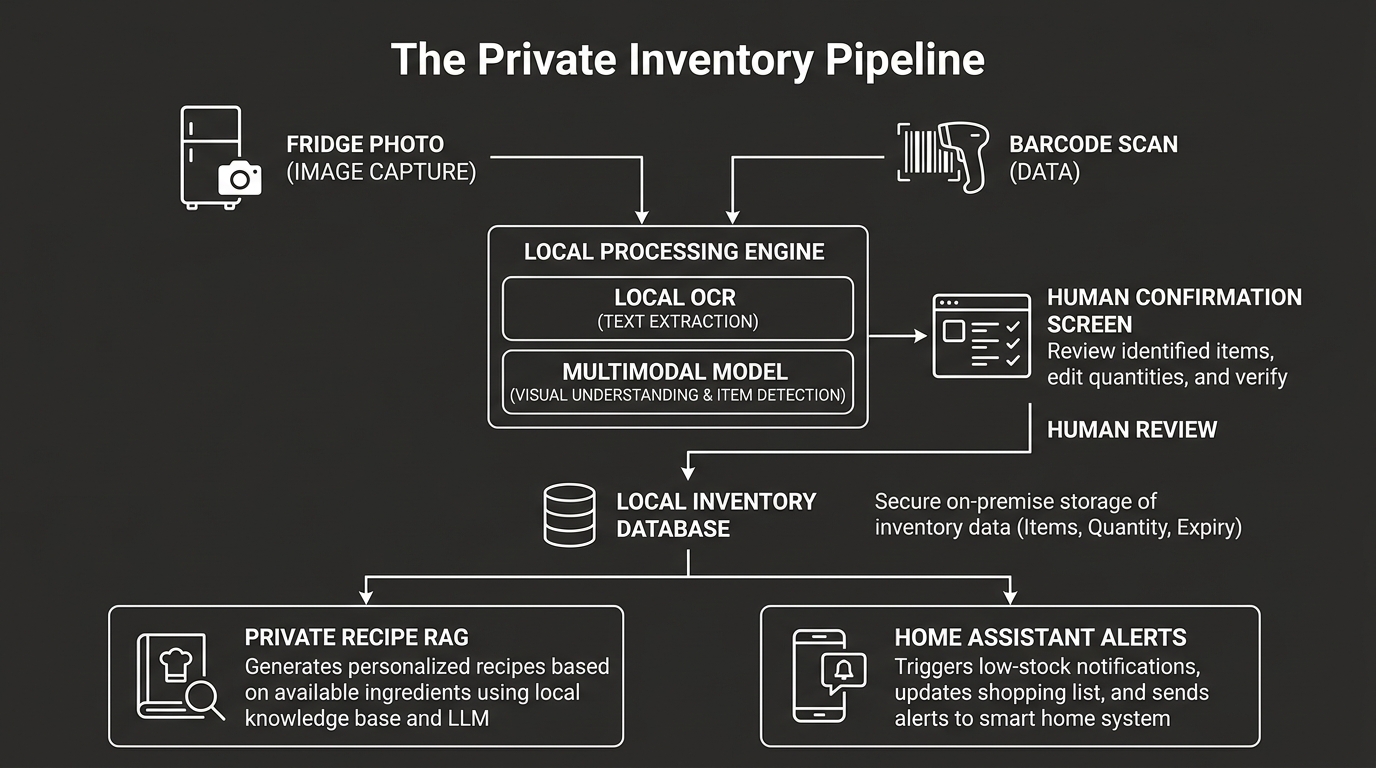
The workflow:
Phone photo / fixed camera / barcode scan
  -> local file inbox
  -> image cleanup
  -> OCR and multimodal item detection
  -> normalization and confidence scoring
  -> household confirmation
  -> local inventory database
  -> recipe and storage-guidance retrieval
  -> meal suggestions and reminders
Keep the original image only as long as it helps correction. The durable record should be structured inventory data, not a permanent gallery of every midnight refrigerator visit.
Capture Better Images Before Buying More Compute
OCR quality depends heavily on the image. The official Tesseract documentation notes that improving input image quality is often necessary for better results.
Use:
- even refrigerator lighting;
- a camera parallel to the shelf;
- one overview image plus close-ups of date labels;
- no motion blur;
- high enough resolution for small print;
- a manual capture button rather than continuous recording.
A fixed USB camera can work for one shelf or pantry zone. A phone is better for awkward labels and leftovers. A cheap barcode scanner is more reliable than computer vision for packaged goods when the local product database recognizes the code.
Avoid wide-angle kitchen surveillance. Trigger capture intentionally and crop to the appliance interior before storing the image.
Run OCR Locally
Tesseract can extract label text without a cloud API:
tesseract `
  ".\inbox\fridge-label.jpg" `
  stdout `
  -l eng `
  --psm 6
--psm 6 assumes a reasonably uniform text block. Packaging is rarely cooperative, so try a few segmentation modes during setup and keep the one that matches your capture style.
OCR output might be:
BEST IF USED BY AUG 18 2026
PLAIN GREEK YOGURT
The parser should preserve both the text and confidence. Never silently convert a weak AUG 18 reading into a database fact.
Add Multimodal Recognition Carefully
A local multimodal model can propose:
{
  "items": [
    {
      "name": "plain yogurt",
      "quantity": 1,
      "label_date": "2026-08-18",
      "date_type": "best_if_used_by",
      "confidence": 0.91
    },
    {
      "name": "spinach",
      "quantity": 1,
      "label_date": null,
      "date_type": null,
      "confidence": 0.63
    }
  ]
}
Use confidence gates:
>= 0.90: show as preselected confirmation
0.65-0.89: require correction or confirmation
< 0.65: do not add automatically
The threshold is your policy, not a universal truth. Test it with your refrigerator, lighting, handwriting, languages, and packaging.
Gemma 4’s multimodal variants can process image inputs locally, while its audio-capable variants can also support spoken corrections. The official Gemma 4 overview lists the modality support by model size. Choose the smallest variant that works reliably on your hardware.
Store Facts, Not Model Prose
A useful inventory row:
{
  "id": "item_20260814_0042",
  "name": "plain Greek yogurt",
  "quantity": 1,
  "location": "fridge_top_shelf",
  "added_at": "2026-08-14T18:42:00-04:00",
  "opened_at": null,
  "label_date": "2026-08-18",
  "date_type": "best_if_used_by",
  "confirmed_by": "household",
  "source_image_deleted": false
}
Track date_type. “Sell by,” “best if used by,” and “use by” do not mean the same thing.
USDA explains that, except for infant formula, food date labels generally describe quality rather than federal safety deadlines. Its food product dating guidance also warns that handling and storage conditions matter.
That means the system should say:
This yogurt reaches its best-if-used-by date in two days.
Consider using it soon.
It should not say:
This yogurt becomes unsafe Tuesday at midnight.Computers enjoy precise deadlines. Bacteria did not agree to the API contract.
Use Temperature as a Separate Safety Signal
Add a refrigerator temperature sensor. Record whether the appliance stayed at the household’s configured safe target and alert on sustained excursions.
Temperature history does not prove that one item is safe, but it catches a failure that image recognition cannot see. Keep these signals separate:
- label date and inventory age;
- measured refrigerator temperature;
- user-confirmed signs of spoilage;
- official storage guidance;
- recalls or manufacturer instructions.
Never ask the model to decide whether questionable meat, seafood, leftovers, or infant formula is safe from a picture. When safety is uncertain, follow official guidance and use human judgment.
The federal FoodKeeper resource provides storage information developed by USDA FSIS with Cornell University and the Food Marketing Institute. It is a better retrieval source than a random recipe blog’s confident paragraph.
Build Private RAG for Recipes
Index material the household trusts:
- personal recipes;
- scanned recipe cards;
- dietary preferences;
- ingredient substitutions;
- appliance manuals;
- FoodKeeper or other permitted guidance;
- meal plans that worked;
- notes about portion sizes.
Keep structured restrictions outside the vector store:
hard_constraints:
  allergens:
    - peanuts
  excluded_ingredients:
    - shellfish
  dietary_rules:
    - vegetarian_monday
The model receives those as non-negotiable constraints. Retrieved recipes are candidates, not authority. A similarity search must never override an allergy list because one casserole paragraph scored well.
Generate Suggestions From Confirmed Inventory
A daily n8n workflow can:
Schedule trigger
  -> query confirmed inventory
  -> prioritize opened and date-sensitive items
  -> retrieve matching household recipes
  -> ask local model for three meal suggestions
  -> validate allergens and exclusions
  -> send Home Assistant notification
The prompt should include only confirmed inventory and clear uncertainty:
Use confirmed items first.
Do not assume unlisted ingredients are available.
Treat best-if-used-by dates as quality guidance, not safety certification.
Never override the hard allergy list.
Return three suggestions with the ingredients each one consumes.
This is where local RAG earns its keep. The model can combine the half-bag of spinach, opened yogurt, and the recipe your family already likes without uploading the contents of the kitchen to a grocery advertising profile.
Make Corrections Faster Than Manual Entry
The confirmation screen should support:
- accept all high-confidence items;
- edit name, quantity, location, and date;
- mark an item as opened;
- remove a false detection;
- scan a barcode;
- say “that is oat milk, not dairy milk”;
- merge duplicates.
Voice correction can use the same local Assist pipeline described in Offline Voice Control for Home Assistant With Gemma 4. Expose narrow inventory actions, not arbitrary database access.
Example actions:
inventory.confirm_item
inventory.correct_name
inventory.mark_opened
inventory.consume_quantity
inventory.delete_item
Keep an audit trail so one misunderstood correction can be undone.
Privacy and Retention
Fridge and kitchen images can reveal:
- household size;
- dietary restrictions;
- medication packaging;
- alcohol use;
- religious or cultural habits;
- schedules and occupancy;
- faces reflected in glossy surfaces.
Store the inbox on encrypted local storage. Bind OCR and model APIs to loopback or a protected server VLAN. Delete source images after confirmation unless a short troubleshooting retention period is genuinely useful.
Back up the inventory and recipe database, not necessarily the photos. If remote access is needed, use a VPN. There is no reason to port-forward an unauthenticated image-processing endpoint to the internet.
Failure Cases to Test
Test the system with:
- two identical products;
- a partially hidden label;
- handwritten leftovers;
- multilingual packaging;
- a date without a year;
- “sell by” and “best if used by” labels;
- reflective plastic;
- an empty container;
- an item removed without being logged;
- refrigerator temperature sensor offline;
- model service unavailable;
- a recipe containing a blocked allergen.
The safe fallback is a correction request or no suggestion. It is not inventing a date because the household is waiting for dinner.
What Success Looks Like
The system succeeds when it lowers the cost of keeping an inventory. It reminds the household about confirmed items, retrieves recipes that fit actual preferences, and helps use food before it is forgotten.
It should remain humble about what it cannot see: storage history before the item entered the house, contamination, internal temperature, recalls, and whether a person handled the food safely.
Local AI earns its place by reducing typing and searching private recipes. Inventory still belongs in structured data, appliance trouble is better detected by temperature sensors, and food-safety decisions should follow official guidance and human judgment.
Keep reading
Related guides

Offline Voice Control for Home Assistant With Gemma 4
Design a private voice control stack for Home Assistant using local speech, Piper output, and a constrained Gemma 4 action layer.
Why Local Home Automation Gets Better With a Local AI Layer
Use Home Assistant, Zigbee, and a local Gemma 4-style model to make home automation more private, resilient, and useful.
AI Energy Management With Home Assistant and EMHASS
Use EMHASS with solar forecasts, dynamic tariffs, EV charging constraints and deterministic Home Assistant fallbacks.