Local-First vs Cloud-First Smart Home: What Actually Changes
Compare local-first and cloud-first smart homes by latency, ownership, outages, privacy, backups, updates, and remote access.
Compare local-first and cloud-first smart homes by latency, ownership, outages, privacy, backups, updates, and remote access.
The original local-first software essay talks about ownership, collaboration, offline work, and long-lived data. Useful principles, but still a little far from the house where a motion sensor is supposed to turn on a light at 2 AM.
In a smart home, local-first is not a philosophy poster. It changes where commands run, where data lives, what fails during an outage, and who can change the rules after you bought the hardware.
Cloud-first is not automatically bad. It is convenient, polished, and often easier for normal people. The problem starts when cloud-first becomes cloud-required for things that clearly happen inside your house.
The Real Difference Is Where Authority Lives
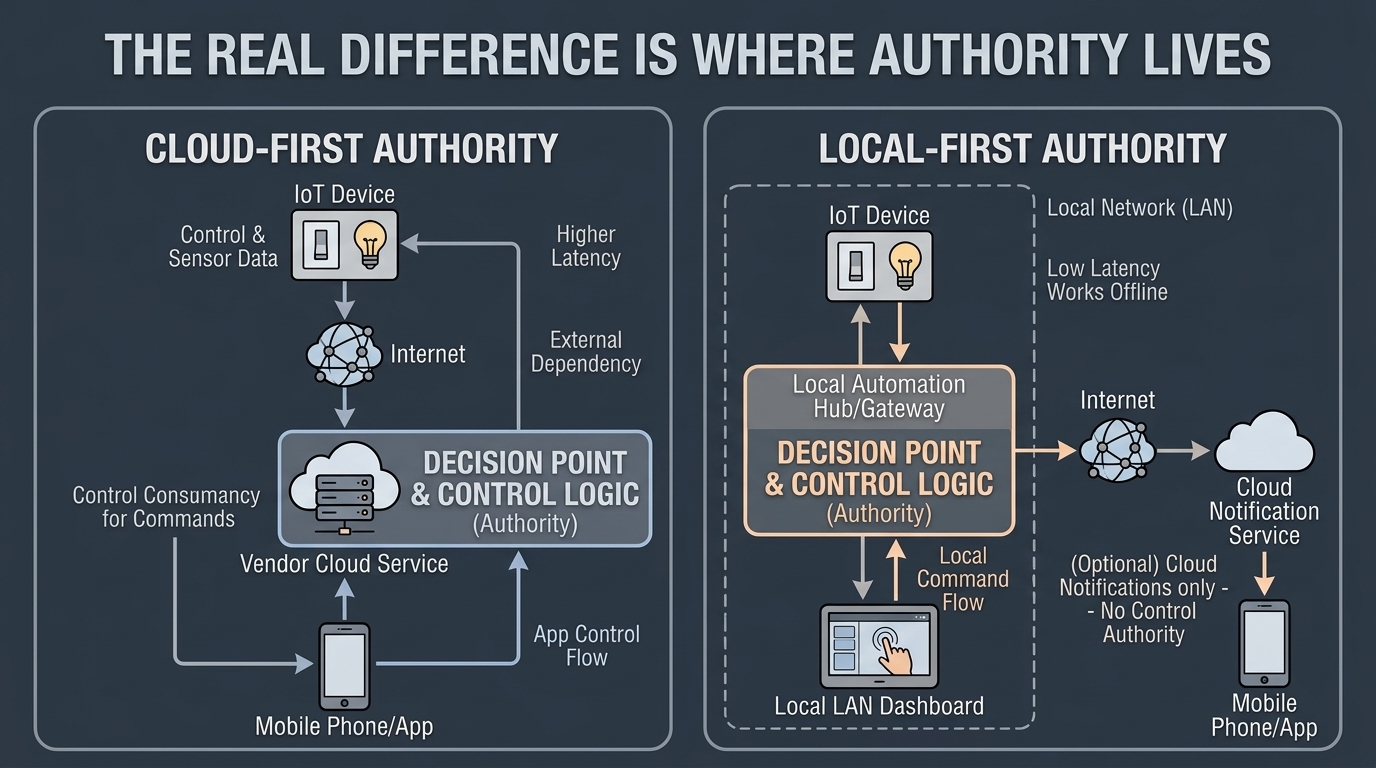
Cloud-first path:
Device
  -> Wi-Fi
  -> vendor cloud
  -> app account
  -> automation rule
  -> command returns through vendor cloud
Local-first path:
Device
  -> Zigbee/Z-Wave/Matter/LAN
  -> local hub or Home Assistant
  -> local automation
  -> local command

Optional:
  -> cloud push notification
  -> encrypted off-site backup
  -> private remote access
The visible user experience might look similar. Tap a button, light turns on. The failure model is completely different.
Latency and Reliability
Cloud-first devices can be fast when the vendor infrastructure is healthy. They can also be weirdly slow for no obvious local reason: app opens, spinner appears, command eventually runs, maybe.
Local-first control removes unnecessary distance.
For a hallway motion light:
Motion sensor -> local coordinator -> Home Assistant -> lightThat should be measured in local network and radio timing, not in whether an account server feels emotionally available today.
This matters most for:
- lights triggered by motion
- leak shutoff routines
- door and lock state
- camera recording
- energy automations
- emergency alerts
- presence-sensitive HVAC
If a task is physically inside the house and time-sensitive, the default should be local.
Ownership Is Not Just Data Export
Cloud-first products often offer data export. That is nice. It is not the same as ownership.
Real ownership means:
- the primary data is accessible without vendor permission
- the system still works if the account is locked
- automations can be inspected and changed locally
- backups can be made and restored by you
- devices are not useless if the vendor pivots, sells, or shuts down
For photos, that means original files and database backups you control. For Home Assistant, that means local config backups. For cameras, local recordings. For smart locks, a fallback entry path. For sensors, local event history where possible.
If the only copy of important household state lives behind a vendor login, you do not own that state in the practical sense. You rent access to it.
Privacy and Household Telemetry
Smart home data is not generic telemetry. It describes life inside the house.
It can reveal:
- when people wake up
- when the house is empty
- which rooms are used
- when doors unlock
- when cameras detect motion
- when energy use spikes
- when someone is home sick, traveling, or changing routines
Cloud-first systems collect this data because that is how they operate. Some vendors handle it responsibly. Some do not. Some are acquired. Some change policies. Some add features nobody asked for. Very exciting, if your hobby is reading privacy policy updates like weather reports.
Local-first reduces exposure by keeping routine state local. You can still choose cloud services for remote notifications or backup, but the normal control loop does not have to publish the household heartbeat outside the house.
Offline Behavior Is the Honest Test
The cleanest test is simple: disconnect the WAN and use the house.
Cloud-first failure examples:
- app cannot reach devices
- automations stop
- camera thumbnails fail
- smart lock remote control fails
- voice assistant cannot execute local actions
- energy dashboard freezes
- device state becomes stale
Local-first expected behavior:
- local dashboard still opens
- automations still run
- camera recording continues
- local DNS still resolves
- NAS still serves files
- local notifications may work on LAN
- remote push may fail until WAN returns
That last line is important. Local-first does not mean every remote convenience survives an internet outage. It means the local functions do.
For a concrete no-WAN architecture, use Local-First No-Cloud Home Architecture That Still Works Offline.
Collaboration and Multi-Device Use
The local-first software world talks a lot about collaboration. In a smart home, the version of collaboration is multiple people and devices interacting with the same home state:
- phones
- wall tablets
- laptops
- voice interfaces
- Home Assistant dashboards
- local automations
- physical switches
- sensors
The trap is making one phone app the source of truth. A house should not depend on one person’s account, phone, or notification settings.
A better pattern:
- Home Assistant owns automation state.
- Physical switches still work.
- Keypads and keys still work for doors.
- Dashboards are useful but not mandatory.
- Family members get scoped access, not admin rights by default.
- Config backups are not trapped on one phone.
Local-first is not anti-user. It is pro-recovery.
Updates: Cloud-First Is Easier, Local-First Is More Accountable
Cloud-first products win on easy updates. Devices update through the app. Bridges update themselves. Features appear. Sometimes they are even wanted.
Local-first asks more of you:
- update Home Assistant
- update Zigbee2MQTT or Z-Wave JS
- update Docker containers
- update firmware deliberately
- keep backups before large changes
- read breaking changes for important integrations
That is work. Pretending otherwise is dishonest.
The payoff is accountability. You know what changed. You can snapshot or back up before changing it. You can avoid updating the entire house at 11 PM because a vendor decided now was a great time.
My rule: cloud-first is fine for low-stakes convenience devices. Local-first is worth the work for anything involving access, safety, cameras, storage, or automations the household actually relies on.
Cost: Subscription vs Hardware
Cloud-first hides cost as subscriptions:
- camera storage plans
- advanced detection features
- remote access tiers
- extended history
- AI features
- premium automation features
Local-first moves cost into hardware and maintenance:
- mini PC or Home Assistant appliance
- Zigbee/Z-Wave coordinator
- NAS or storage disks
- UPS
- managed switch
- backup drives
- occasional replacement parts
Neither is free. The difference is what you keep if you stop paying.
If a camera subscription ends, do you lose recording history? If a photo service changes terms, can you leave with originals and metadata? If a vendor stops supporting a bridge, does the device become landfill with batteries?
That is the cost question that matters.
Security: Local Does Not Automatically Mean Secure
Local-first can be safer, but only if you do the boring parts:
- unique admin passwords
- two-factor auth where remote access exists
- no public admin dashboards
- VPN or private overlay for remote access
- VLANs for IoT and cameras
- backups tested before updates
- logs and alerts for critical services
- UPS for core devices
A badly maintained local server exposed to the internet is worse than a well-run cloud product. Local-first gives you control. It also gives you responsibility. Very rude of it, but there we are. For network design, NIST’s home and small-business IoT guidance explicitly recommends putting higher-risk IoT devices on a separate segment from everyday computers.
For a practical server baseline, A Local-First Home Server Software Stack That Does Not Fight You is the better starting point than randomly installing every container with a nice logo.
When Cloud-First Is Fine
Cloud-first is fine when:
- the device is low impact
- failure is annoying but not serious
- the vendor service is the actual value
- you do not need long-term ownership
- local alternatives are not worth the maintenance
Examples:
- decorative holiday lights
- a non-critical voice assistant routine
- a weather service
- temporary experiment devices
- services where remote collaboration is the point
Not everything needs a home lab around it. The goal is not ideology. The goal is choosing the right failure model.
When Local-First Should Be the Default
Choose local-first for:
- smart locks and access control
- cameras and NVR recording
- Home Assistant automations
- leak, motion, and safety sensors
- family photos and documents
- DNS and internal service discovery
- backups
- energy monitoring
- emergency alert logic
If the device affects safety, privacy, evidence, access, or household continuity, local-first is usually worth the extra work.
Final Answer
Cloud-first optimizes onboarding. Local-first optimizes ownership and failure recovery.
The best smart home is usually hybrid, but with a clear line: cloud for optional remote convenience, local for core behavior. If the internet disappears and the house suddenly forgets how to be a house, the architecture is upside down.
Keep reading
Related guides
Reduce Food Waste With Local OCR, Private RAG and Fridge Photos
Turn fridge photos into a private local inventory with OCR, recipe retrieval and honest date-label alerts that require confirmation.
Build a Digital Home That Still Works Without the Internet
Design a local-first digital home where lights, locks, cameras, automations, files, and dashboards keep working during internet outages.
How to Migrate a Smart Home From Cloud-Dependent to Local-First
Move cameras, automations, storage, DNS, and remote access toward local-first control without breaking the house in one weekend.