Build a Digital Home That Still Works Without the Internet
Design a local-first digital home where lights, locks, cameras, automations, files, and dashboards keep working during internet outages.
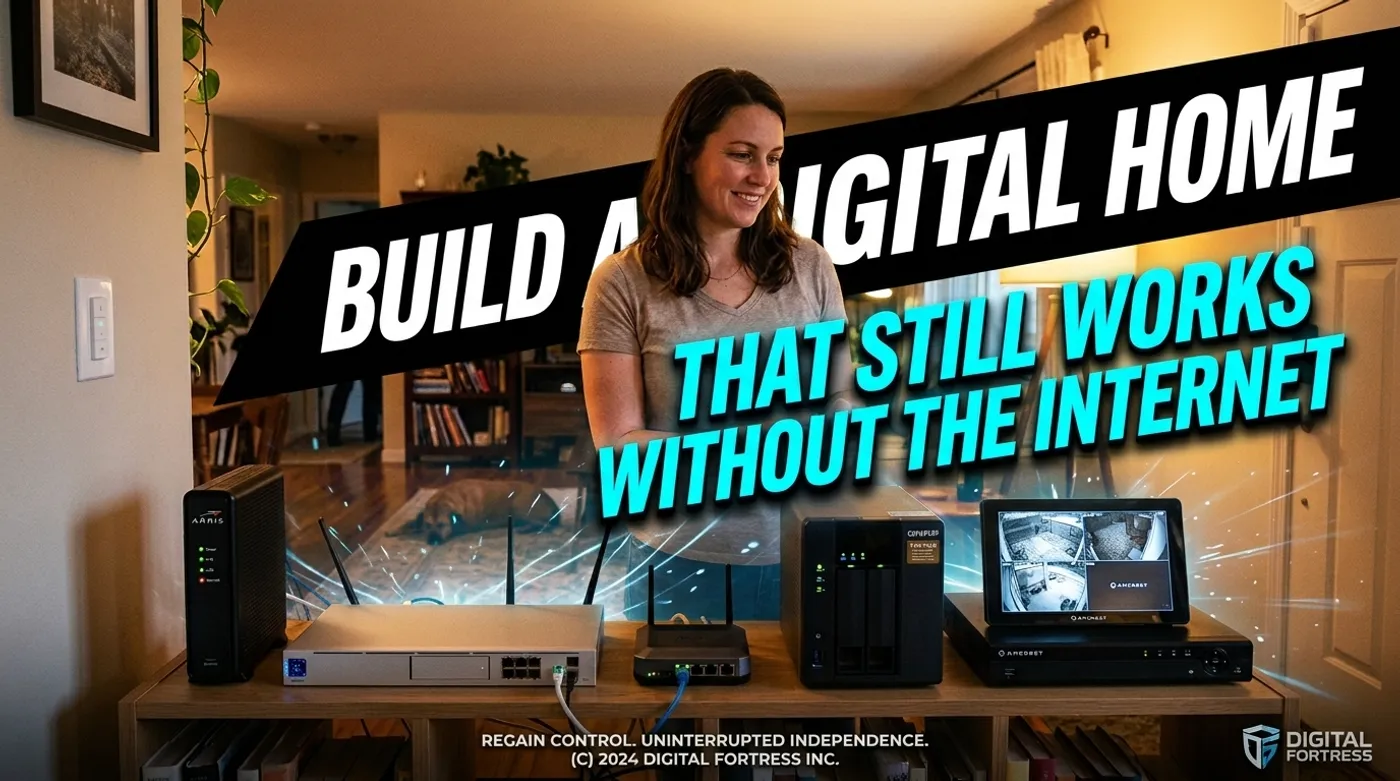
Design a local-first digital home where lights, locks, cameras, automations, files, and dashboards keep working during internet outages.
In the real home-automation setup behind this guide, the internet went down and the failure was more educational than any architecture diagram. Some lights still followed their local motion sensors. The camera recorder kept writing footage. A few app-controlled devices became decorative plastic. The voice assistant, naturally, responded to the outage by becoming a Bluetooth speaker with opinions.
That is the honest test of a digital home: when the WAN cable is disconnected, does the house keep doing the jobs that happen inside the house?
A local-first home does not reject the internet. It decides which functions are allowed to depend on it. Remote notifications can fail during an outage. Weather forecasts can wait. Hallway lights, door access, leak alerts, camera recording, and local files should not need a round trip through somebody else’s server.
Internet Outage and Power Outage Are Different Tests
People often mix these together.
During an internet outage, the modem or upstream connection fails, but your router, Wi-Fi, Ethernet, local servers, and radio coordinators can remain online. Local devices should still communicate.
During a power outage, those devices stop unless they have battery or UPS power. Local-first cannot negotiate with a dead power supply.
Plan for both:
| Failure | What should remain available |
|---|---|
| WAN outage | Local automations, LAN dashboards, locks, cameras, NAS, local DNS |
| Short power outage | Router, Wi-Fi, Home Assistant, radio coordinator, critical sensors, selected storage |
| Vendor cloud outage | Local control and local history |
| Home Assistant outage | Physical switches, manual locks, keypad entry, standalone safety devices |
| Router outage | Manual controls and direct device behavior only |
The final two rows matter. Local-first is not “put everything behind Home Assistant and hope the mini PC develops emotional resilience.” Critical devices need manual behavior that survives the control plane.
Decide What the House Must Do Offline
Write the requirements in household language, not protocol language.
For example:
- bedroom and hallway switches still control lights;
- the front-door keypad and physical key still work;
- leak sensors can trigger a local siren or shutoff routine;
- cameras continue recording to the local NVR;
- Home Assistant opens from phones connected to home Wi-Fi;
- family files remain available from the NAS;
- heating and cooling retain safe manual controls;
- smoke and carbon-monoxide alarms remain independent safety devices.
Now mark optional functions:
- mobile push notifications outside the home;
- cloud voice assistants;
- weather and traffic data;
- off-site backup replication during the outage;
- remote viewing from another city;
- vendor app history.
This list prevents a common mistake: spending a week making a decorative lamp work offline while the doorbell camera still records only to a subscription.
The Offline-First Control Path
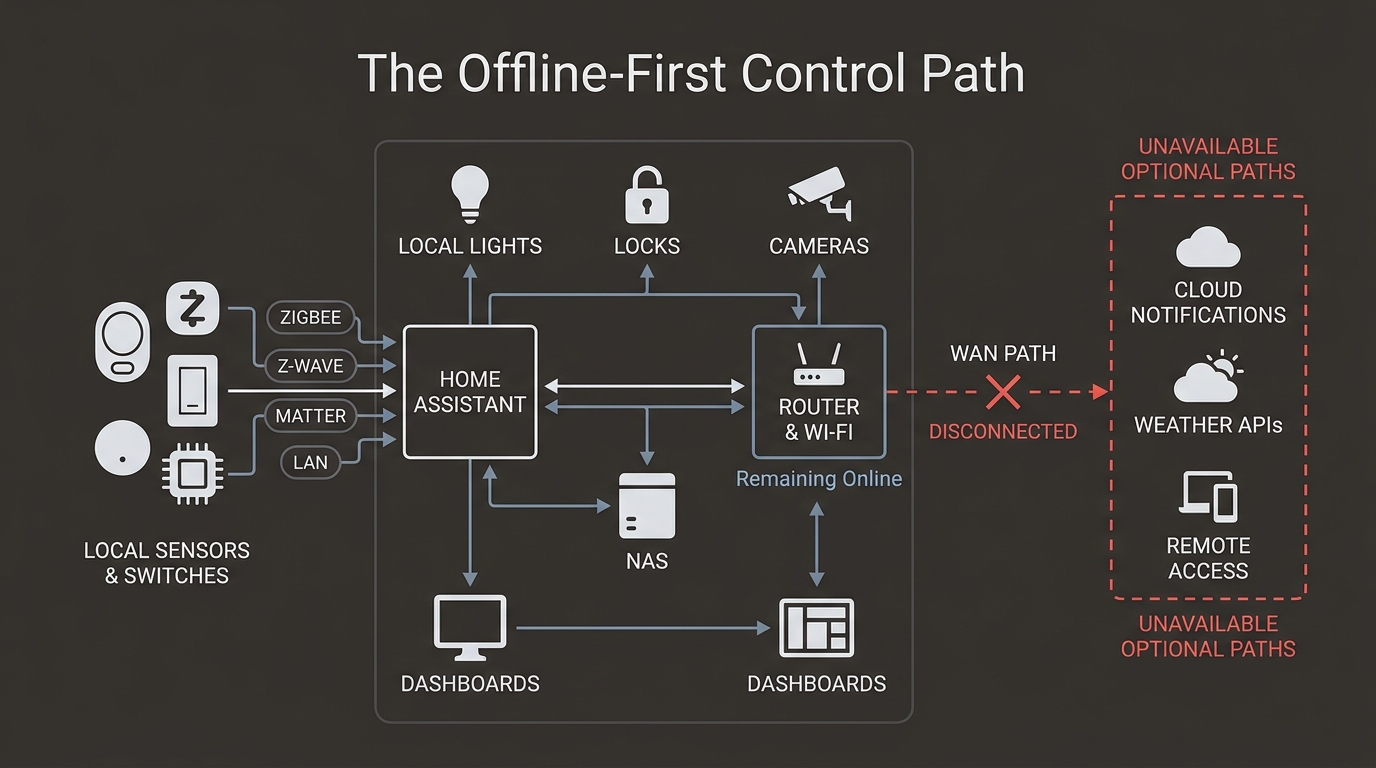
A practical control path looks like this:
Physical switch / sensor / keypad
  -> Zigbee, Z-Wave, Matter, or local LAN
  -> local coordinator or device API
  -> Home Assistant automation
  -> light, lock, siren, valve, or local notification

Camera
  -> local RTSP or ONVIF path
  -> NVR
  -> local recording storage

Phone on home Wi-Fi
  -> local DNS
  -> Home Assistant, NAS, and NVR dashboards

Optional WAN paths
  -> mobile push
  -> weather data
  -> remote VPN entry
  -> encrypted off-site backup
The original local-first software essay describes the network as optional and user ownership as a core principle. In a house, that becomes concrete: the primary copy of the automation and the primary control path live at home.
For the deeper VLAN, DNS, storage, and firewall design, use Local-First No-Cloud Home Architecture That Still Works Offline. This article focuses on the household failure model and the migration order.
Use Local Radios and Local APIs for Core Devices
Zigbee and Z-Wave devices communicate through a local coordinator. They do not each need a cloud account or Wi-Fi connection. Matter can also provide local control, but the exact feature set and remote behavior still depend on the controller and ecosystem.
Wi-Fi devices are not automatically cloud-dependent. The question is whether they expose a documented local API, MQTT, ESPHome, HomeKit Device, or another integration that continues working without WAN.
Before buying or migrating a device, ask:
- Can Home Assistant control it while WAN is disconnected?
- Does a physical switch or keypad still work?
- Is state reported locally or only through the vendor account?
- Does setup require cloud once, or does normal operation require it forever?
- What happens when the vendor discontinues the app?
“Works with Alexa” answers none of those questions. It confirms that two cloud accounts can exchange messages when both companies are in a cooperative mood.
Keep Home Assistant and the Radio Coordinator Local
Run Home Assistant on hardware inside the house: a Home Assistant appliance, a mini PC, or a stable VM or container. Keep the Zigbee or Z-Wave coordinator on the local host or a documented local network connection.
Back up the configuration outside the Home Assistant machine. Home Assistant’s current backup guidance recommends another system and ideally an off-site copy. Off-site storage does not violate local-first. It is a backup destination, not the authority deciding whether the kitchen light may turn on.
Use conservative automations for access and safety:
- local sensor state as the trigger;
- physical confirmation where possible, such as a door contact before auto-lock;
- manual override that does not need Home Assistant;
- explicit behavior when an entity is
unknownorunavailable; - alerts for low batteries and failed services.
Never make internet availability a hidden condition for a critical routine.
The Router Must Keep Routing Without WAN
Your router is still required during an internet outage. It provides Wi-Fi, DHCP, local routing, and often DNS. Do not unplug it when testing offline behavior.
Reserve stable addresses for infrastructure:
Router:          10.10.0.1
Local DNS:       10.20.0.10
Home Assistant:  10.20.0.20
NAS:             10.20.0.30
NVR:             10.20.0.40
If you use local names, home.arpa is the correct residential namespace. RFC 8375 reserves it for names that have local significance inside a home network.
ha.home.arpa   -> 10.20.0.20
nas.home.arpa  -> 10.20.0.30
nvr.home.arpa  -> 10.20.0.40
Test local DNS with WAN disconnected. Some routers forward every query to an ISP resolver and handle local names poorly. If the resolver lives on a local server, make sure clients can still reach it and that you know how the network behaves when that server is down.
Cameras Must Record Without the Vendor App
A security camera that stops recording when the internet fails has missed the central job.
For local continuity:
- use cameras with RTSP, ONVIF, or a supported local stream;
- record to a local NVR or NAS;
- provide local NTP if timestamps depend on network time;
- let the NVR initiate required connections to the camera network;
- block cameras from initiating connections to trusted devices;
- decide explicitly whether cameras may reach WAN for firmware or vendor features.
Remote app thumbnails may fail during an outage. Local recording should not. Those are separate paths, despite consumer apps doing their best to blur the distinction.
Network segmentation is not only a homelab preference. NIST guidance for home and small-business IoT recommends separating higher-risk IoT devices from everyday computers where possible.
Locks Need Local Entry and Manual Fallback
For a lock, offline operation means more than a dashboard button.
Test:
- physical key or manufacturer-supported emergency entry;
- inside thumb turn;
- local keypad codes;
- local lock state in Home Assistant;
- jammed-bolt reporting if supported;
- battery alerts;
- behavior when Home Assistant is unavailable;
- behavior when WAN is unavailable.
Remote unlock from another city will not work without internet. That is expected. A resident standing at the door should still be able to enter without asking a cloud API for permission.
Store Files and Backups Locally, but Keep an Off-Site Copy
A NAS or home server keeps photos, documents, Home Assistant backups, and camera exports available on the LAN. It does not become a complete backup merely because it has multiple blinking lights.
Use three layers:
Primary data on local device or server
  -> local backup on separate disk or NAS
  -> encrypted off-site copy or rotated drive elsewhere
During a WAN outage, local files remain available and off-site replication pauses. When connectivity returns, replication resumes. That is a healthy dependency: the internet improves resilience but is not required to open your own files at home.
Put the Control Plane on a UPS
A small UPS should prioritize:
- modem or ONT if you want service to recover cleanly;
- router and firewall;
- core switch;
- one access point;
- Home Assistant host;
- Zigbee or Z-Wave coordinator;
- NVR or NAS only if runtime and graceful shutdown are planned.
Do not expect a small UPS to run a storage-heavy system all night. Twenty minutes can still bridge short outages and prevent dirty shutdowns. Measure the actual load, configure shutdown signaling where supported, and replace aging UPS batteries before the beeping becomes the household monitoring system.
Find the Hidden Cloud Dependencies
These often appear only during the first no-WAN test:
- an app requires account login before showing local devices;
- a token expires and cannot refresh without cloud;
- an automation calls a weather or geolocation API;
- voice control depends on remote speech processing;
- a camera records locally but its app refuses to open;
- mobile notifications use internet push services;
- device discovery works only during cloud-assisted setup;
- a dashboard loads fonts, scripts, or images from a public CDN;
- local DNS depends entirely on an upstream resolver.
Do not fix every failure by restoring WAN access to the device. First decide whether the failed feature is core or optional. A weather card can remain blank. A leak shutoff cannot.
Run a Real No-WAN Test
Choose a quiet time. Tell the household. Save the router configuration and confirm that critical devices have manual controls.
Then:
- Leave the router, switches, access points, and local servers powered.
- Disconnect the WAN cable or disable the WAN interface.
- Disable cellular data on the test phone so it cannot quietly route around your experiment.
- Open Home Assistant using its local address.
- Use physical switches and verify state updates.
- Trigger one motion automation and one low-risk alert.
- Confirm the smart-lock keypad and manual fallback.
- Confirm the NVR is still receiving and writing camera footage.
- Open a file from the NAS.
- Reboot Home Assistant while WAN is still down and verify recovery.
- Restore WAN and confirm cloud notifications and off-site jobs recover.
Record each failure in a table:
| Function | Expected offline | Actual result | Dependency found | Fix |
|---|---|---|---|---|
| Hallway motion light | Yes | Failed | Vendor cloud scene | Rebuild in Home Assistant |
| Camera recording | Yes | Passed | None | No change |
| Phone push alert | No | Failed as expected | Internet push service | Accept |
| Front-door keypad | Yes | Passed | Local lock storage | No change |
Repeat the test after major router, Home Assistant, coordinator, or camera changes. Architecture diagrams age gracefully. Real systems develop hobbies.
Build It in This Order
Do not replace the whole house in one weekend.
Start with physical control and one local automation. Then move access, camera recording, local dashboards, storage, and DNS. Add VLANs after you understand the required traffic. Add private remote access only after the local path is stable.
The goal is not to produce a home that never uses the cloud. The goal is to make cloud services optional for the things that happen under your roof.
When the internet goes down, you may lose remote convenience. You should not lose the house.
Keep reading
Related guides
Reduce Food Waste With Local OCR, Private RAG and Fridge Photos
Turn fridge photos into a private local inventory with OCR, recipe retrieval and honest date-label alerts that require confirmation.
How to Migrate a Smart Home From Cloud-Dependent to Local-First
Move cameras, automations, storage, DNS, and remote access toward local-first control without breaking the house in one weekend.
Local-First vs Cloud-First Smart Home: What Actually Changes
Compare local-first and cloud-first smart homes by latency, ownership, outages, privacy, backups, updates, and remote access.