Immich Hardware Requirements: Mini PC, NAS, or Old Desktop?
Choose practical Immich hardware for photo backup, video thumbnails, machine learning, storage growth, and low idle power.
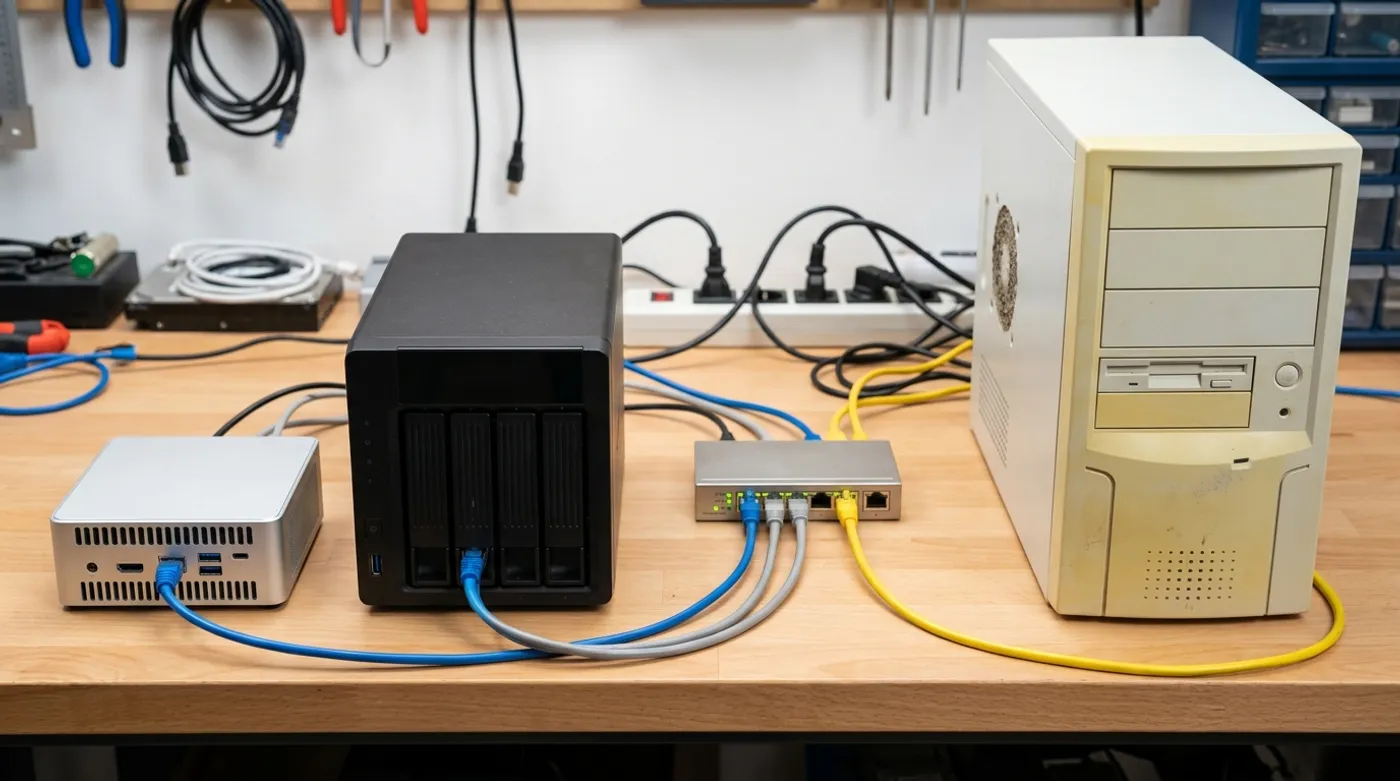
Choose practical Immich hardware for photo backup, video thumbnails, machine learning, storage growth, and low idle power.
Immich does not need a rack server. It also does not love being thrown onto the weakest box in the house and blamed for being slow. Uploads, thumbnails, video work, machine learning, and PostgreSQL all compete for CPU, RAM, and disk I/O.
The right hardware depends on library size and patience. A small family library can run fine on modest hardware. A large video-heavy archive will expose old CPUs and slow disks quickly.
The Practical Baseline
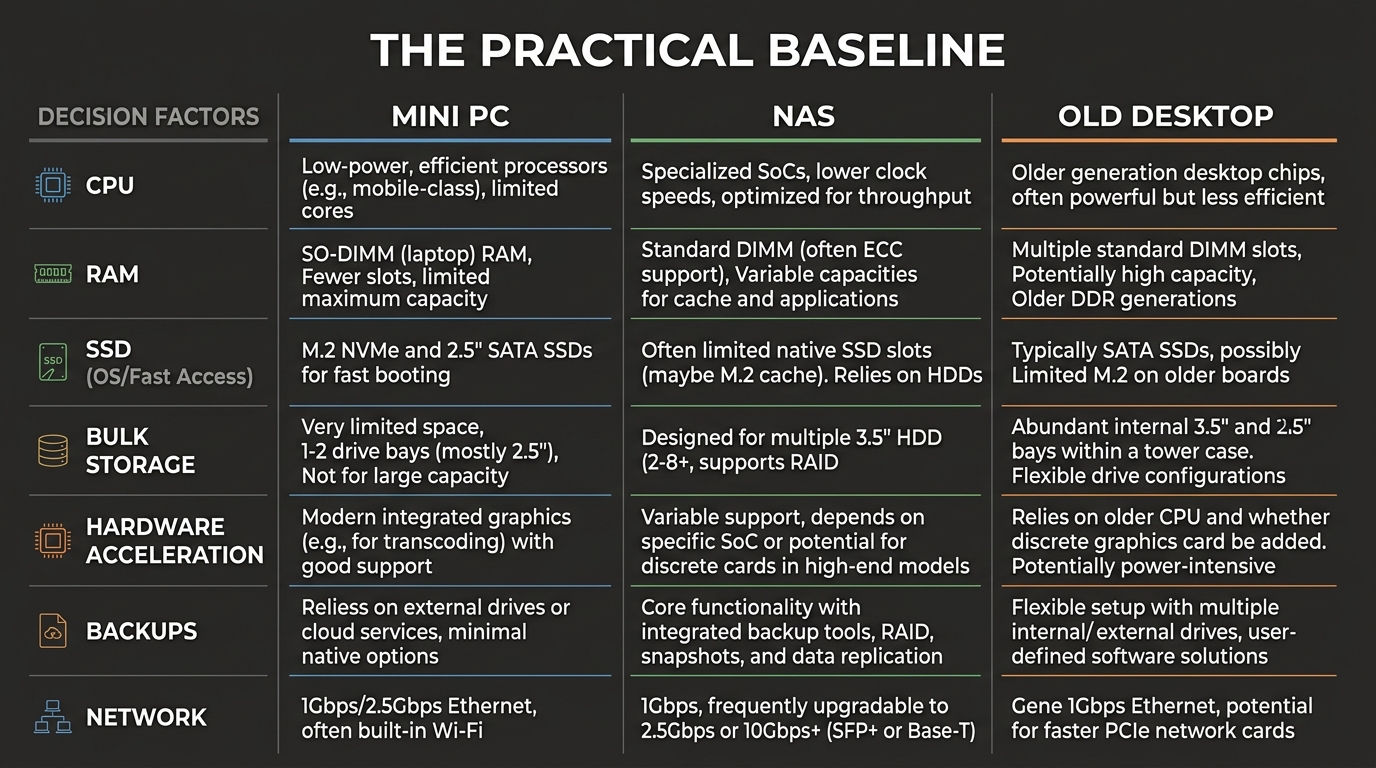
For a first Immich server, aim for:
- modern 4-core CPU
- 16 GB RAM
- SSD for operating system and database
- large HDD, NAS, or external storage for originals
- wired gigabit Ethernet
- backup storage separate from the primary library
RAM matters because Immich is not a single process. The server, database, Redis, machine learning container, and other services all need room. Storage matters because videos and thumbnails can create a lot of I/O during imports.
Mini PC
A used business mini PC is often the best first Immich host. It is quiet, power-efficient, inexpensive, and strong enough for Docker workloads. Intel-based mini PCs can also be attractive when hardware acceleration matters, depending on generation and configuration.
The downside is storage expansion. Many mini PCs only hold one NVMe drive and maybe one 2.5-inch drive. That is fine if originals live on a NAS or external disk. It is limiting if the mini PC is supposed to be the whole storage platform forever.
NAS
A NAS is strong when storage safety and drive bays are the main concern. It can hold larger disks, expose shares, run snapshots, and centralize backups. Some NAS models can run Immich directly, but app performance depends heavily on CPU, RAM, and container support. Do not assume every NAS is a good app server.
The clean model is often:
- NAS stores the photo library and backups
- mini PC runs Immich containers
- Immich accesses storage over the LAN or through a mounted path
That separation keeps storage boring and compute flexible.
Old Desktop
An old desktop is useful if you already own it and it has enough RAM and drive bays. It may also be the cheapest way to get multiple disks into one box.
The trade-off is idle power, noise, and reliability. A machine that costs nothing upfront can become expensive if it runs hot and draws too much power all year.
Hardware Acceleration
Immich has hardware acceleration options for media workflows, but support depends on host hardware, drivers, container configuration, and the current Immich documentation. Treat acceleration as a performance optimization, not a requirement for the first install.
Start with a working software-only setup. Then enable hardware acceleration after you know uploads, backups, and restores work. This makes troubleshooting much cleaner.
Product Categories to Research
This post needs hardware affiliate research because readers are choosing a platform:
- Used Intel mini PC with 16 GB RAM
- Used Lenovo ThinkCentre Tiny, Dell OptiPlex Micro, or HP EliteDesk Mini
- 1 TB NVMe SSD for OS, database, and cache
- 4 TB to 12 TB NAS hard drive for originals
- 2-bay or 4-bay NAS
- External USB backup drive
- Gigabit switch
- Small UPS
Avoid recommending a single exact model without checking current price, availability, and firmware limitations. The category matters more than one listing.
What I Would Choose
For a first Immich build, I would usually pick a used mini PC with 16 GB RAM and an SSD, then put the long-term photo storage on a NAS or separate backup disk. That gives Immich enough compute without pretending a tiny chassis is a storage platform.
If the library is video-heavy, prioritize CPU, SSD space, and hardware acceleration options. If the photos are irreplaceable, prioritize backup storage before speed upgrades. A fast import is nice. A recoverable library is mandatory.
Keep reading
Related guides
How Much Hardware Does a Private ChatGPT Actually Need?
Size CPU, RAM, VRAM and storage for Open WebUI, Ollama, local RAG and multiple users without buying an oversized AI server.
Local RAG With Open WebUI: Chat With Documents Without the Cloud
Build an offline Open WebUI RAG workflow for PDFs with local embeddings, practical chunking, evidence checks and private storage.
Open WebUI on Windows: Build a Private ChatGPT With Ollama
Run Open WebUI and Ollama on Windows with persistent storage, LAN access controls, backups and no accidental internet exposure.