Home Server vs NAS: What Should You Build First?
Compare a home server and a NAS by workload, storage safety, app flexibility, power use, backups, and long-term maintenance.
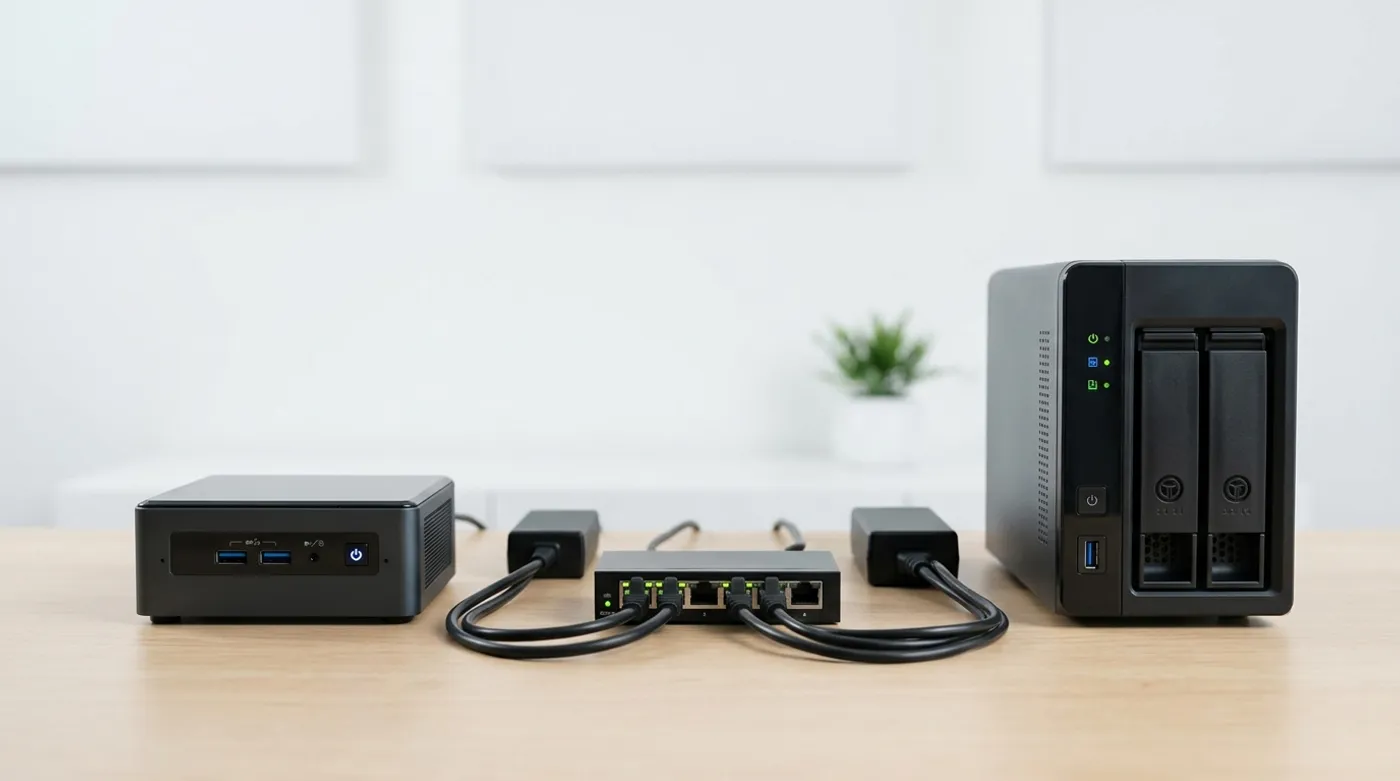
Compare a home server and a NAS by workload, storage safety, app flexibility, power use, backups, and long-term maintenance.
A NAS and a home server overlap enough to confuse people, but they are not the same purchase. A NAS is a storage appliance first. A home server is a general-purpose machine that happens to store things if you ask it to.
The decision gets easier when you stop asking “which one is better?” and ask what job is currently failing in your house. If files are a mess, buy or build storage. If apps are the problem, build a server.
Choose a NAS First When Storage Is the Job
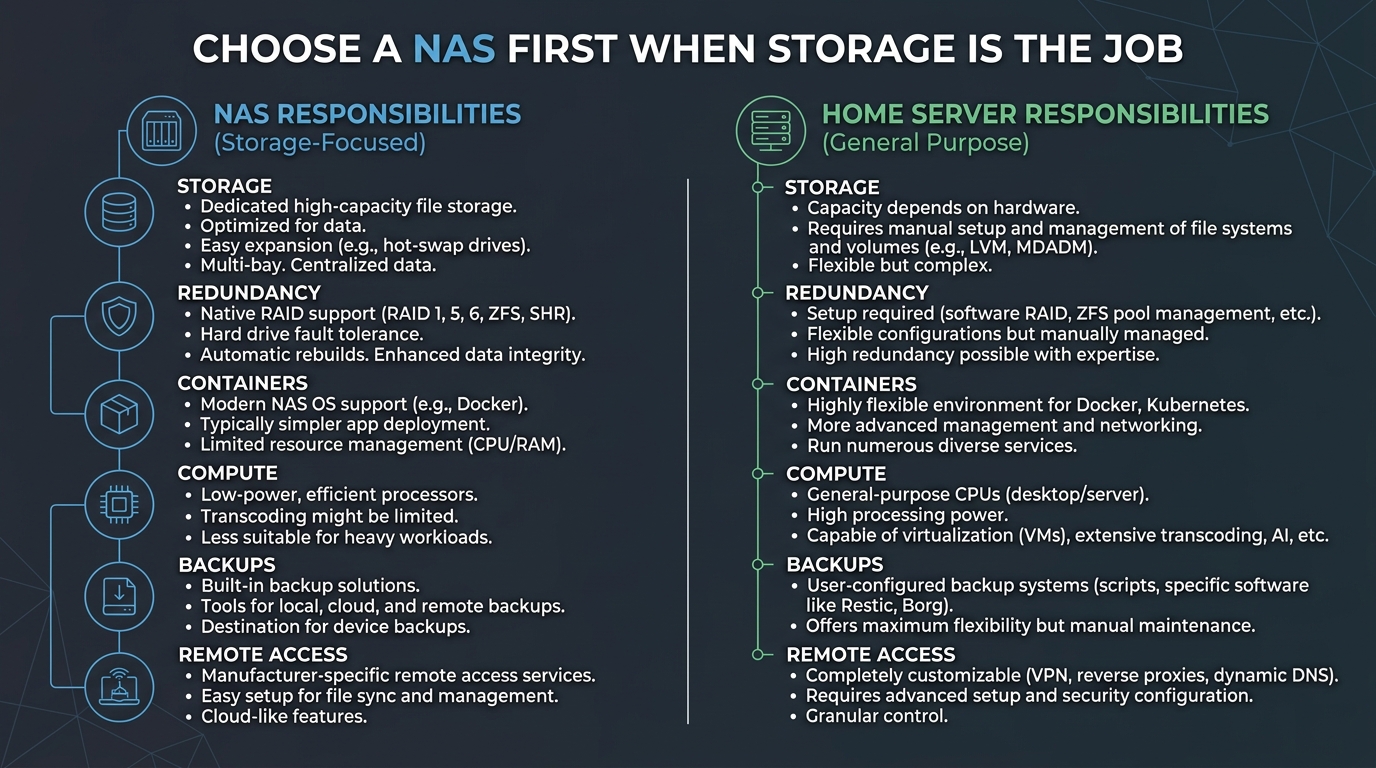
Choose a NAS-first setup if your main needs are:
- shared family files
- laptop backups
- photo storage
- media library storage
- simple snapshots
- drive health monitoring
- low-maintenance operation
A NAS is valuable because it gives storage a shape. Drive bays, snapshots, SMART monitoring, shares, permissions, and a boring web UI reduce the number of decisions you have to get right.
The trade-off is flexibility. Some NAS platforms run apps well, but you are still inside the appliance model. Hardware upgrades, container behavior, and advanced networking may be more constrained than on a normal Linux box.
Choose a Home Server First When Apps Are the Job
Choose a home server if you want to run:
- Immich
- Home Assistant
- Docker stacks
- local DNS
- a reverse proxy
- development environments
- media services
- automation bridges
- monitoring tools
A home server gives you more control over CPU, RAM, storage layout, and networking. It is also easier to repurpose. A used business mini PC can start as a Docker host and later become a dedicated automation box, backup target, or lab machine.
The trade-off is responsibility. You own the operating system, updates, disk mounts, backup scripts, firewall exposure, and restore process.
The Hybrid Setup That Works Well
For many homes, the cleanest architecture is both:
- NAS for bulk storage and snapshots
- Mini PC home server for applications
In that model, the NAS stores data and backups. The server runs apps. Immich, for example, can run on the mini PC while storing originals on a mounted NAS share or backing up to the NAS. Home Assistant can run on the server while the NAS stores backups.
The advantage is separation. If an app update breaks a container, your storage appliance is still boring. If the NAS needs maintenance, the app server can be handled independently.
Network Design
Keep the design simple:
- Main LAN:
10.10.0.0/24 - NAS:
10.10.0.10 - Home server:
10.10.0.20 - Camera VLAN if needed:
10.30.0.0/24 - IoT VLAN if needed:
10.40.0.0/24
Give the NAS and server DHCP reservations. Limit admin access to trusted devices. If the NAS exposes SMB, do not expose that share to guest Wi-Fi or untrusted IoT devices.
If you later add VLANs, the server can become the controlled integration point. For example, Home Assistant may need limited access to IoT devices, while personal laptops do not need direct access to every smart plug.
Backup Model
The backup model decides whether the setup is serious:
- NAS snapshots protect against accidental changes.
- Server app backups protect container state.
- Offline or external backups protect against theft, ransomware, and major mistakes.
- Off-site backups protect against house-level disasters.
RAID is not backup. A mirror can survive one disk failure, but it will not save you from deletion, corruption, malware, or a bad application writing bad data.
Product Categories to Research
This post can support affiliate links because the build path depends on hardware. Research these categories:
- 2-bay or 4-bay NAS appliance
- Used business mini PC
- NAS-rated hard drives
- NVMe or SATA SSD for app workloads
- External USB backup drive
- UPS for NAS, server, router, and switch
- Unmanaged or managed gigabit switch
For most people, storage quality matters more than chassis aesthetics. Buy fewer decorative accessories and spend the money on backup media.
My Rule of Thumb
If the household is losing track of files, start with a NAS. If you mainly want Immich, Home Assistant, local DNS, Docker stacks, and experiments, start with a mini PC home server. If the budget allows both, separate the jobs: NAS for data, server for apps.
That split is not fancy. It is just easier to live with. Storage should be boring infrastructure. Apps can break, update, move, and get rebuilt without dragging the entire photo archive into the blast radius.
Keep reading
Related guides
How Much Hardware Does a Private ChatGPT Actually Need?
Size CPU, RAM, VRAM and storage for Open WebUI, Ollama, local RAG and multiple users without buying an oversized AI server.
Local RAG With Open WebUI: Chat With Documents Without the Cloud
Build an offline Open WebUI RAG workflow for PDFs with local embeddings, practical chunking, evidence checks and private storage.
Open WebUI on Windows: Build a Private ChatGPT With Ollama
Run Open WebUI and Ollama on Windows with persistent storage, LAN access controls, backups and no accidental internet exposure.